What Is a WebRTC IP Leak? Prevention and Browser Privacy
What is a WebRTC IP leak? Learn how ICE candidates expose network identity, how browser-level controls prevent leaks, and how to validate proxy consistency.
BotBrowser Team
Prefer the maintained product doc?
This article has a matching page in the docs center. Use the docs for the canonical setup flow, current flags, and long-term reference.
WebRTC gives a page a second view of the network. Before any call connects, the browser can report which local interfaces exist, which public address a STUN server observed, and which relay answered. BotBrowser can align those observations with a profile and an approved route, for the paths the browser sends through that route, while the relay, the peer, and the profile itself keep decisions this control does not make.
TL;DR
- A page proxy rewrites HTTP requests, and gathering can follow a different path, so a passing page-load check says nothing about WebRTC.
- Each type reports a separate fact:
hosta local interface,srflxthe address a STUN server saw,relaya TURN endpoint, andprflxa mapping the peer discovered. - BotBrowser selects the ICE server list and the exposed candidate information through
--bot-webrtc-ice, while--bot-webrtc=profileand--bot-webrtc=disableddecide whether WebRTC follows the profile or disappears. - Release evidence is
iceGatheringStateatcomplete, a grid inchrome://webrtc-internalsthat matches the approved route, andgetStats()reporting the same local candidate.
Contents
- What a gathered candidate exposes
- Where browser-level control stops
- How BotBrowser handles ICE servers and candidates
- Verify the candidate set before release
- Practical decision guide
- Practical conclusion
Watch the video
This English-language video shows what a page learns from RTCPeerConnection gathering before any call starts. A local lab page declares three candidate sets, and one script reads each with the normal candidate callback; the lab then compares each declared server-reflexive address with the declared HTTP-seen address. The same kind of call then ran in official Google Chrome with an empty ICE server list: two host candidate lines on a Windows machine and one on an Ubuntu machine, each carrying an mDNS name. It shows what these two machines returned, and a matching list is consistency, not anonymity. No BotBrowser profile is involved. The audio is English.
What a gathered candidate exposes
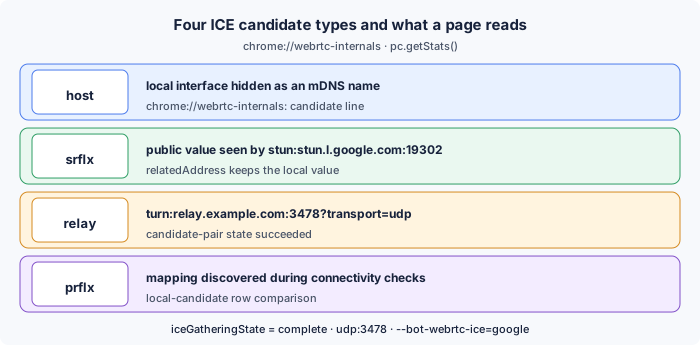
A candidate is one possible path for media, and its type field records how the browser learned that path: host, srflx, prflx, or relay. Chrome normally produces all four while a call is set up, and each one answers a different question about the network behind the session. The useful review question is not whether a candidate exists, but what that candidate lets a page conclude about the machine, the route, and the relay that answered.
| Type | What the page learns | Field in chrome://webrtc-internals | Expected in a controlled context |
|---|---|---|---|
host | A local interface value, or an mDNS name that hides it | candidate line of the local description | An mDNS name, or a value the profile defines |
srflx | The public address a STUN server saw | candidate line plus relatedAddress | The approved egress, not the host uplink |
relay | The TURN endpoint that will carry media | candidate line with typ relay | Present when TURN is configured and reachable |
prflx | A mapping a peer discovered during checks | candidate-pair row in the statistics view | Absent, or consistent with the approved route |
The table matters because a deployment can pass one row and fail another. A profile that hides private interface values still leaves srflx rows that describe whatever egress the STUN request used, and a TURN relay adds a second public-facing value that the peer will see during media. Reviewing the four types separately also makes a failure report specific: a missing relay row points at the TURN entry or the UDP path, while an unexpected prflx row points at the peer side of the connection.
Host candidates and the mDNS name
host candidates describe a network interface on the machine that runs the browser. Modern Chrome hides private IPv4 and IPv6 values behind an mDNS name such as 4f2a9c1e-7b3d-4a52-9e88-1c6d0b8f2e11.local, so a page sees that an interface exists without learning the value behind it. That is a meaningful limit, and it is also incomplete: the mDNS name is stable for the lifetime of the profile, it appears in the local description, and it appears again in the statistics view under local-candidate. A page can compare two visits and learn whether both used the same interface, which is why WebRTC mDNS Candidates and Local-Network Privacy treats the name itself as a review item rather than a solved case.
Host gathering still happens when the machine sits behind a proxy. The proxy changes the egress for page requests; it does not remove local interfaces, so the browser keeps enumerating them unless the profile policy states otherwise. A controlled context should therefore show either an mDNS name or a value the profile defines, and the deployment record should name which of the two the profile produces.
Server-reflexive candidates and the observed value
srflx candidates exist because the browser sent a STUN binding request to a server, and the reply named the source that server saw. The common path uses stun:stun.l.google.com:19302 over udp:3478. The reply carries the mapped public value, and the relatedAddress field keeps the local value that produced it, so one row can hold both sides of the same mapping.
A srflx row is the row most leak reports quote, because it describes something the host did not choose. When the request travels through an approved route, that value is the route egress. When it travels directly, the value is the host uplink. The two outcomes look the same in the list, which is why a review has to record the route and not only the value, and why Proxy Consistency Across DNS and WebRTC compares the HTTP egress, the resolver answer and the candidate value in one pass.
Relay and peer-reflexive candidates
relay candidates appear when a TURN server is configured and reachable. The browser allocates a value on the server, and media then flows through turn:relay.example.com:3478?transport=udp. The row names the TURN endpoint rather than the host, so it is the row that shows a deployment has a media path which does not depend on the local uplink.
prflx candidates appear when a peer check reaches the browser from a value the browser did not predict. The row is created from that check rather than from local enumeration, so it records what another party saw. A controlled context that shows a prflx row has evidence that some path avoided the planned mapping, and the review should treat that as a question about the peer and the path rather than about the profile.
Where browser-level control stops
The limits are easier to describe once the four types are known. Every approach below changes what the page or the browser API reports, and none of them changes what a peer or a TURN server observes once media starts flowing.
Settings and extensions
Disabling WebRTC through a browser setting, for example media.peerconnection.enabled in Firefox, removes gathering entirely. The absence is observable: a page can test whether RTCPeerConnection exists and whether createOffer() resolves, and a browser without the API stands out among the population the page expects.
Extensions can intercept onicecandidate, rewrite RTCIceServer lists, or replace the constructor. They run after the native gathering code has produced its values, so a value the page obtains through the prototype path can still differ from the one the networking layer used. Patching also leaves traces in the object shape: a different prototype chain, a getter that returns a modified value, or a callback that fires later than the page expects.
VPN and relay limits
A VPN moves every OS connection into a tunnel, which changes what the STUN server sees but not what the machine enumerates. Host rows still describe local interfaces, and media still negotiates with the peer unless a TURN relay is required. The tunnel also adds a second egress that the deployment may not have approved, and a review that only looks at the proxy will miss it.
Relay services carry their own limits. A TURN endpoint answers with a value from its own pool, usually in a region chosen when the service was provisioned, and that value will differ from the proxy egress. The difference is expected and should be recorded, because a review that treats every new value as a leak will keep raising the same question.
How BotBrowser handles ICE servers and candidates
BotBrowser changes the ICE server list and the candidate information the browser exposes, using the loaded profile together with launch flags. The controls sit below the JavaScript layer, so a page that reads pc.localDescription or pc.getStats() receives the values the profile and the flags produced.
Three switches for ICE configuration
| Switch | What it selects | What stays outside it |
|---|---|---|
--bot-webrtc-ice="google" | Server list stun:stun.l.google.com:19302 | Whether udp:3478 reaches that server |
--bot-webrtc-ice="custom:..." | A named STUN or TURN list | Credentials for that relay |
--bot-webrtc=profile | WebRTC settings stored in the profile | The proxy route |
--bot-webrtc=disabled | Removal of the WebRTC capability | Nothing: the absence is visible to the page |
The distinction between the two families is worth keeping. --bot-webrtc-ice chooses servers, and --bot-webrtc chooses posture. A launch that sets only the posture keeps the server list at the profile value, and a launch that sets only the server list keeps whatever posture the profile already records. Reading one of the two and assuming the other is how a deployment ends up with a profile that looks correct and a session that gathers through another route.
Flags and proxy paths
A common launch pairs the preset with a proxy and a local DNS policy:
chrome --bot-profile="path/to/profile.enc" \
       --proxy-server="socks5://user:[email protected]:1080" \
       --bot-webrtc-ice="google" \
       --bot-local-dns \
       --bot-timezone="America/New_York" \
       --bot-locale="en-US"
A custom list names the STUN and TURN servers directly:
chrome --bot-profile="path/to/profile.enc" \
       --proxy-server="socks5://user:[email protected]:1080" \
       --bot-webrtc-ice="custom:stun:stun.example.com:3478,turn:turn.example.com:3478?transport=udp"
Automation passes the same values through the launch arguments:
const { chromium } = require('playwright-core');

(async () => {
  const browser = await chromium.launch({
    executablePath: 'path/to/botbrowser/chrome',
    args: [
      '--bot-profile=path/to/profile.enc',
      '--proxy-server=socks5://user:[email protected]:1080',
      '--bot-webrtc-ice=google',
      '--bot-local-dns',
    ],
    headless: true,
  });

  const context = await browser.newContext();
  const page = await context.newPage();
  await page.goto('https://example.com');
  await browser.close();
})();
Paths through a relay
An approved media path has to reach the TURN endpoint from the browser, and the transport decides whether it can. Where the proxy service carries UDP, socks5://user:[email protected]:1080 can carry the STUN and TURN traffic as well, so page requests and media share one route. Where the service carries only TCP, turn:turn.example.com:3478?transport=udp will not answer through it, and a ?transport=tcp relay has to be approved as a separate path. UDP over SOCKS5: Private QUIC and WebRTC Routing covers the per-context transport decisions and the checks behind them.
Verify the candidate set before release
A verification pass has three parts: the gathering state, the grid that lists every candidate, and the statistics record for the pair that carried media. The three together take a few minutes and leave evidence that a later review can compare against the deployment record.
Read the gathering state in chrome://webrtc-internals
Open chrome://webrtc-internals, start the test page, and watch iceGatheringState. It moves from new to gathering and ends at complete. The page shows a grid with one row per candidate, the type column, the address, the port, the protocol, and the relatedAddress value. A grid that never reaches complete means gathering is still running or stalled. A grid that reaches complete with only host rows means no STUN reply arrived.
Compare the grid with pc.getStats()
pc.getStats() returns local-candidate records with candidateType, address, port, protocol, and relatedAddress, plus candidate-pair records with state, nominated, localCandidateId, and remoteCandidateId. The nominated pair with state: succeeded is the path that carried media. Look up its localCandidateId, then confirm that the matching local-candidate row reports the type and value the grid showed. Two views that disagree, for example a grid row with an mDNS name and a statistics row with a private IPv4 value, mean the page and the media path used different interfaces.
When relay candidates are missing
A complete state without a relay row is the most common failure, and this order resolves it fastest:
- The server list has no TURN entry. The grid then shows
hostandsrflxrows only, which a launch with--bot-webrtc-ice="google"produces by design. - The TURN URL lacks
?transport=udp. A relay URL without a transport parameter falls back to TCP and stays silent on a path that only carries UDP. udp:3478is filtered on the egress. The TURN allocation never completes, norelayrow appears, andchrome://webrtc-internalsshows the attempt ending without a candidate.- The
--bot-webrtc-icevalue does not match the profile. A custom list that names a host the profile does not allow, or a preset the deployment did not license, leaves the launch with a server list nobody chose, and the grid shows exactly that list.
Each step is a single check, and the grid usually answers it without reading logs: the row for the TURN endpoint either exists or it does not.
Practical decision guide
Decide the posture and the server list together, then verify the result against the route the deployment approved.
- Pair
--bot-webrtc-icewith--proxy-server. Without a proxy the egress is already the host uplink, and the flag only changes which server reports it. - Use the
googlepreset unless the deployment names its own infrastructure.stun:stun.l.google.com:19302is the configuration most traffic uses, so a session that omits it looks unusual for another reason. - Add
--bot-local-dns. Name resolution and media are the two paths that most often leave a proxy unaddressed, and closing both keeps the review short. - Reach for
--bot-webrtc=disabledonly where the application genuinely has no media features. The missing API is visible, and a page can record that difference. - Re-run the three-part check after every change of proxy endpoint, TURN provider, or profile. The candidate list is a product of all three inputs.
Does BotBrowser break calls? No, RTCPeerConnection stays available and media still flows. The flags change which servers gather and which values the page receives.
What is the difference between the two flags? --bot-webrtc-ice chooses servers, and --bot-webrtc chooses whether WebRTC follows the profile or is removed.
Is a VPN enough? A VPN changes the egress for every connection but leaves host rows in place, and it adds an egress the deployment may not have approved.
What about IPv6? The same four types apply, and a profile value that covers IPv4 without covering IPv6 leaves a visible difference between the two families.
Practical conclusion
A leak review that only reads page traffic misses the path media takes. Record the posture, the server list, and the approved route; gather until iceGatheringState reports complete; compare the grid with getStats(); and keep the result next to the deployment record. When a later session shows a different row, the comparison names the change instead of leaving a reviewer to guess.
For the surrounding network controls, see Proxy Configuration, DNS Leak Prevention, and Multi-Account Browser Isolation. The features page lists the related product capabilities, and the WebRTC mDNS candidates article explains what the mDNS name adds to a host row.
Sources
All guides on this topic
Related Articles
WebRTC mDNS Candidates and Local-Network Privacy
NetworkWebRTC Network Identity and Privacy: Choosing the Right Policy
NetworkDNS Leak Prevention: Resolver Paths, Proxies, and Leak Tests
NetworkUDP over SOCKS5: Private QUIC and WebRTC Routing
NetworkProxy, DNS, and WebRTC Consistency for a Coherent Browser Identity
NetworkProxy Configuration Overview: A Browser Network Decision Map
Take BotBrowser from research to production
The guides cover the model first, then move into cross-platform validation, isolated contexts, and scale-ready browser deployment.