Browser Profile Backup and Recovery Governance
Govern browser profile backups with clear ownership, encryption, recovery tests, retention, and safe BotBrowser boundaries.
BotBrowser Team
Want the structured docs for Identity?
This article lives in the editorial library. For step-by-step setup, reference material, and ongoing updates, jump into the docs section.
BotBrowser can provide a repeatable, declared profile and context for an authorized recovery test. It cannot recover a server account, decrypt a secret without its key policy, prove that a backup contains no personal data, or make a restored browser anonymous. Backup is therefore a governance decision as well as an infrastructure task.
Define what is backed up
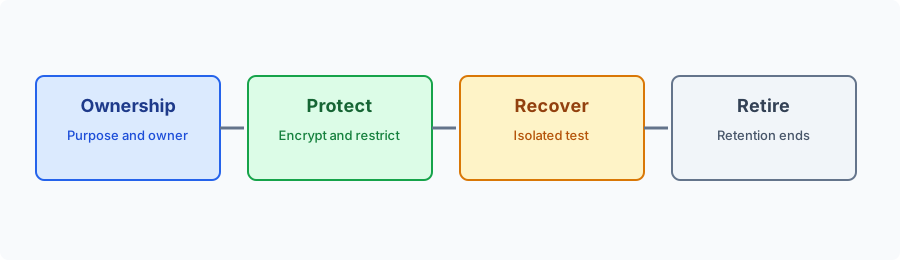
Inventory the categories before selecting a tool: cookies, Web Storage, IndexedDB, Cache Storage, service-worker registrations, permissions, downloads, extensions, and application exports. These categories have different owners, retention periods, and recovery behavior. A profile directory is not a universal portable format. Mark each category as restore, recreate, expire, or never copy. Keep browser state separate from server state. A local backup does not transfer account ownership, revoke a remote session, or delete server records. Use synthetic fixtures for recovery tests and exclude credentials, tokens, private URLs, and unnecessary browsing history. Record the purpose, owner, source release, target release, retention, and deletion trigger in the inventory.
Protect the backup
Apply least privilege to upload, read, restore, delete, and approve operations. Encrypt backups in transit and at rest, keep keys in a separately governed secret-management system, and log access without logging profile contents. OWASP recommends separating secrets from source data and limiting their exposure; the same boundary applies to profile archives that may contain session material.
Use immutable or append-only records for approval and retention events where practical. A backup filename should use a neutral inventory ID, not a customer name or account identifier. Test that a revoked operator cannot read old archives and that expired archives are removed according to policy.
Test recovery as a controlled change
NIST SP 800-34 treats recovery planning as a process of defined roles, alternate resources, testing, and maintenance. Apply that discipline to browser profiles: name an incident owner, define recovery time and data objectives, keep a clean target environment, and rehearse the visible application journey.
Restore into an isolated target with the approved browser release, profile family, host class, locale, route, and storage policy. Compare one dimension at a time. Check that the expected workspace opens, permissions are re-requested when required, application data is intact, and the session closes cleanly. A successful page load is not proof that every category or remote record was restored.
Handle failure and rollback
Use explicit states such as staged, restoring, partially-restored, verified, rejected, and retired. Preserve the accepted source until the owner confirms the target result and retention decision. If a category is not portable, recreate it through the application or use a documented empty-state fallback. Do not broaden the copy silently after a failure.
Quarantine damaged or unverified archives. Do not edit a production backup in place or attach it to another identity. Record the failed category, browser release, target environment, visible result, and next action. If a remote deletion is asynchronous, report it as pending rather than complete.
BotBrowser capability and limitation
BotBrowser supports assigned profile packages and repeatable profile-backed contexts for authorized recovery validation. It can help compare a declared browser journey across approved releases and hosts. It does not own backup encryption, key custody, retention approval, server-side account recovery, consent, or deletion of remote data. Product evidence is one bounded input to the organization’s recovery and privacy decision.
Operational checklist
- Assign an owner and purpose to every archive.
- Classify each state category as restore, recreate, expire, or never copy.
- Separate profile data, server data, credentials, and encryption keys.
- Test recovery in an isolated target with visible application checkpoints.
- Keep rollback and retention decisions recorded until verification completes.
- Retire archives on schedule and review access logs.
Related guidance: Profile management explains ownership and release pairing; Browser storage model maps local state categories; Privacy by design covers purpose limitation. Build the inventory before the archive. Start with a data map that a service owner can read without opening a private profile directory. Give every category a business purpose, an owner, a source of truth, a maximum retention period, and a recovery action. Cookies may represent a short-lived session, while an IndexedDB record may be a draft or an offline queue. Cache entries can be recreated, but an application may still need a warm cache for a controlled performance test. A permission is a user decision, not merely another file. An extension may have its own update and review process. A download may be a customer document that belongs in a document system rather than a browser archive. The inventory should distinguish required, optional, and prohibited data. Required data is the smallest set needed for the stated recovery objective. Optional data can improve continuity but increases exposure and test burden. Prohibited data includes credentials, recovery codes, payment material, and unrelated browsing history unless a separate policy explicitly authorizes it. This classification makes a restore request reviewable before an operator has access to the source profile. Use stable inventory identifiers and immutable revision events. When an owner changes the scope, create a new revision that records the reason, approver, effective date, and sunset date. Do not rewrite an old entry so that a later reader believes the broader scope existed from the beginning. A clear history helps incident responders decide whether a recovered workspace was expected to contain a category or whether it should have been recreated. Separate keys and recovery authority. Encryption is useful only when the key boundary is real. Store archive keys in a separately governed secret-management service, with distinct permissions for creating, using, rotating, and revoking keys. The worker that copies a profile should not automatically be able to export the decryption key. The operator who approves a recovery should not gain standing access to every archive. Use short-lived authorization for exceptional restores and record who approved it, for which inventory revision, and for how long. Plan for key loss and key compromise. A recovery objective that depends on one person’s workstation key is not a durable plan. Document an approved break-glass path, test it with synthetic data, and require review after use. If a key is suspected to be exposed, stop restores that depend on it, preserve the audit record, rotate according to the key policy, and determine which archives need re-encryption. Do not copy decrypted profile contents into a general support folder while investigating. Logs should prove the control without becoming a second profile store. Record archive ID, revision, actor, action, result, and timestamp. Avoid values that identify a person’s sites, session token, account name, or private URL. Where a diagnostic capture is necessary, protect it with a short retention period and a named deletion owner. A status such as “permission category unavailable” is normally enough for a support report; the raw permission database is not. Design a recoverable target.
A target environment should be reproducible enough that a result can be interpreted. Record browser release, operating system family, profile family, host class, locale, network policy, extensions, storage policy, and application version. Keep the target isolated from the accepted source so a failed attempt cannot alter the only usable copy. Use a fresh storage location and a separate scheduler assignment.
Define visible checkpoints before the exercise: the application opens the expected workspace, a permitted draft is readable, a required permission prompt appears, an intentionally omitted category shows a documented fallback, and the session closes without a lock. Checkpoints are more useful than a generic “restore succeeded” flag because they show which part of the journey the evidence actually covers. Repeat the checkpoints after a browser release update or a change to the application’s storage schema. Compare one dimension at a time. If the target changes browser release, host image, locale, route, and profile package together, a failure cannot identify the responsible boundary. Keep a clean baseline and a known synthetic fixture. Run the same exercise more than once, including a browser restart if production uses one. Record observed differences as product behavior for the tested combination, not as a universal promise about every browser or site. Recovery, rollback, and retention. Treat recovery as a controlled change with a start condition, an owner, an approval, and an end condition. The source remains protected while the target is staged. If the target passes its checkpoints, the owner decides whether to retain the source for the declared period, retire it immediately, or keep it under a separate continuity policy. If the target fails, return the assignment to the queue and preserve the reason. Do not repeatedly retry with a broader data set simply because the first target was incomplete. Rollback has multiple meanings. It may close the target and return to the source, delete local restored state, revoke a server session, or wait for a remote deletion request. Name the action in the runbook and in the operator status. If a remote operation is asynchronous, show pending status and a follow-up owner. A local cleanup cannot prove that a remote record is gone. Likewise, restoring a cookie cannot prove that the account owner still consents to the session. Retention should have a start event and a deletion event. A backup kept “until the incident is over” has no objective end. Tie retention to the inventory revision, exercise ID, or approved continuity period. Test deletion with the same care as restoration: check primary storage, replicas, temporary staging locations, and access logs according to the organization’s policy. Record completion without retaining the deleted content as evidence. Review the governance loop. Review backup scope after a browser major release, profile package change, host image update, application storage migration, extension change, permission model change, or incident. A package that worked last quarter may still decrypt while producing a different application result. Re-run the representative journey and update the support boundary when a category becomes recreate-only or expires sooner. Recovery governance is successful when an operator can answer five questions quickly: what is this archive for, who approved it, what does it contain, how was the target tested, and when must it be deleted? If an answer requires opening profile contents or guessing from a filename, the inventory is incomplete. Keep the customer-facing explanation at the category and outcome level, and keep restricted evidence behind the access controls that protect the profile itself. Make the runbook usable during an incident. An incident runbook should begin with a decision, not a command. State whether the event is loss of a host, corruption of local state, suspected key exposure, an application regression, or a request to continue an authorized session. Each case can have a different recovery scope. A lost host may need a clean target and a narrow fixture. Suspected key exposure may require a hold on all restores while the key owner investigates. An application regression may be better served by recreating state on the previous release than by restoring a broad archive to the new one.
List the people who can approve each action and the evidence they need. The on-call operator may be able to stage a target, while a data owner approves access to customer content and a security owner approves a break-glass key. Put contact paths and expiry times in the runbook. Record every decision against the inventory revision so the next operator can distinguish a deliberate exception from an accidental shortcut. Verify application boundaries. The browser is only one part of a recovery. An application may keep authoritative records on a server, in a document store, or in a separate identity provider. A restored cookie can cause a page to appear signed in while the server has already expired the session or changed the account policy. A restored IndexedDB record can display a draft whose server copy was deleted. For each checkpoint, identify whether the observation comes from local state, a server response, or a user decision. Keep the test fixture small enough to inspect. Use a synthetic account, a deliberately labelled document, and a short-lived permission. Validate the expected server response through the application’s normal interface rather than exporting a database dump. When the server is unavailable, say that the local target was staged but the end-to-end recovery remains unverified. Treat privacy as an operating property. A backup policy should explain who may learn that an identity used a particular application, not only who may open the archive. Inventory names, access logs, timestamps, and recovery outcomes can reveal operational patterns. Restrict those records, define their retention, and redact customer identifiers in wider reports. When sharing a result, share the category and visible outcome rather than a profile export. Accessibility is part of recovery quality: a user should understand whether a workspace is restored, partial, waiting for a remote action, or ready for a fresh permission decision. Keep that explanation current when application roles, retention rules, or approval contacts change, and retire obsolete runbook steps instead of leaving conflicting instructions for the next exercise. A concise status helps a support operator answer questions without exposing private session material for every team. Keep product claims bounded. Public product language should name the declared release, profile, context, and authorization boundary. “Repeatable” means the same declared setup can be exercised again; it does not mean that every site, server session, extension, or operating-system state will match. “Profile-backed” identifies a browser-side input; it does not claim ownership of remote data. “Recovery validation” means that chosen checkpoints were observed; it does not certify a disaster-recovery plan or a privacy review. When evidence changes, update the claim and date, keep the previous record as historical evidence, and mark it superseded. Keep an additional a short decision record with the owner, test date, release pairing, visible checkpoints, excluded categories, retention deadline, and next review trigger. This makes recovery evidence useful to operators and reviewers without copying sensitive browser contents into a new system.
This wording also helps support teams set expectations during a stressful event: the declared setup can be replayed, the observed checkpoints can be compared, and the remaining uncertainty can be named. It does not promise that an account, document, permission, or remote session will survive merely because a local directory was copied. Owners should publish the recovery objective, the categories intentionally excluded, the target release, the evidence date, and the action required when a checkpoint fails. Reviewers can then approve a narrow test without approving an unbounded transfer of personal data. Engineers can improve the restore path by changing one boundary at a time, and operators can stop safely when a control is missing. A concise, dated record is more useful than a broad claim that cannot be reproduced.
Sources
NIST SP 800-34 Rev. 1, Contingency Planning Guide, OWASP Secrets Management Cheat Sheet, MDN Storage API, and BotBrowser profile management.
Related Articles
Take BotBrowser from research to production
The guides cover the model first, then move into cross-platform validation, isolated contexts, and scale-ready browser deployment.