Browser Profile Migration Planning and User Consent
Plan browser profile and session-state migration with explicit consent, storage boundaries, compatibility checks, and reversible recovery.
BotBrowser Team
Want the structured docs for Identity?
This article lives in the editorial library. For step-by-step setup, reference material, and ongoing updates, jump into the docs section.
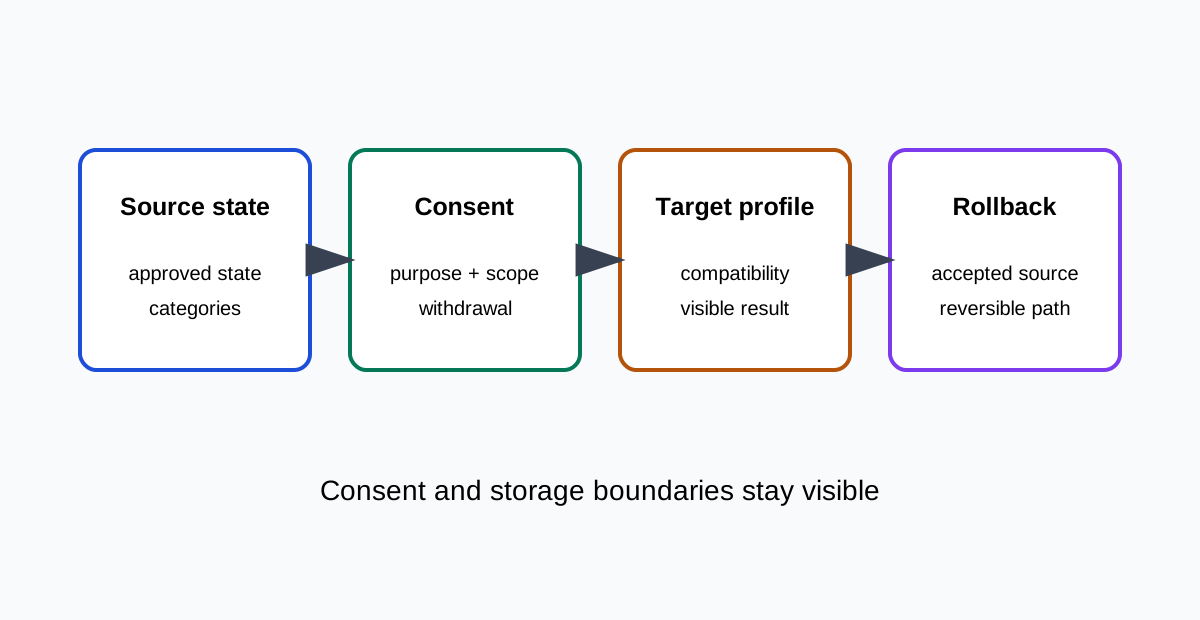
BotBrowser can repeat an authorized profile-backed browser journey and keep a declared profile, browser release, and context boundary visible. It cannot transfer a person’s consent, make a site accept migrated state, erase server records, or prove that a migrated profile is anonymous. Profile migration is therefore a product and privacy decision, not a file-copy operation. The same principle applies when an organization changes a managed browser image or moves a test workload between hosts. A visible success should identify the journey that completed and the categories that were intentionally excluded. That makes a support conversation precise: the team can discuss a missing preference, an expired session, or a new consent request without claiming that every part of the old environment was reproduced. It also gives a reader a practical way to decide whether a migration is appropriate for a personal workspace, a controlled fixture, or a service-owned recovery flow.
Define the migration purpose
Start with the user-visible reason: continue a saved task, move an approved test fixture, recover a workspace, or change browser hosts. State what should move and what must remain clean. Cookies, Web Storage, IndexedDB, Cache Storage, service-worker registrations, permissions, downloads, and extensions have different ownership and retention behavior. Do not bundle them into a single promise called “the profile.” Consent is a choice about a purpose and scope. A person agreeing to continue a workspace is not automatically agreeing to copy every site permission, credential, or browsing record. Show the source, destination, data categories, retention period, and reversal path before migration. Record refusal as a valid state and keep the old state available only under the declared policy. Explain the choice in plain language, including whether the source remains usable, which support channel can answer questions, and how long the decision remains valid. A narrow consent record is easier to review than a broad statement that appears to authorize every future use. It also gives the user a clear place to change the choice later, without requiring a new interpretation of the original migration today.
Separate browser and server state
Browser state is local to a profile, context, origin, or browser data directory. Server state may include account sessions, uploaded files, audit events, and retention records. Copying local state does not transfer server ownership or delete the source. A successful page load after migration does not prove that a server session was invalidated, that an account was unlinked, or that a site accepted the new environment. Use an explicit state map. For each category, mark migrate, re-create, expire, or never copy. Keep credentials and personal content outside a general migration archive unless the user has a separate approved recovery flow. Prefer synthetic fixtures for validation. A fixture should have a named owner, a short lifetime, and a cleanup rule. When a migration is tested with a returning session, say so explicitly because the result may depend on state that a new user would not have. Keep the public explanation at the level of categories and visible outcomes rather than copying raw values. Public evidence should record visible completion, not tokens, private URLs, raw storage dumps, or account names.
Check browser compatibility
The HTML Standard and MDN describe storage APIs, origin rules, permissions, and browser lifecycle concepts. They do not define a universal portable profile format. A state created by one browser release can be interpreted differently by another release, platform, graphics path, or policy. Test the supported journey on the target browser and profile pair. Use a clean baseline, an approved source state, and a target state. Compare one change at a time: browser release, profile family, host, locale, route, or storage policy. The acceptance result should be visible: the user can reopen the workspace, the consent decision is shown accurately, and the intended fallback appears when a category is not portable. Repeat the same checkpoints after a browser update and keep the release, operating system, and profile family beside the result. This makes a failed migration diagnosable without pretending that one successful route proves every site or device behaves identically.
Preserve consent and choice
Consent records should identify purpose, scope, timestamp, policy version, and withdrawal path without exposing unnecessary personal data. A stored consent flag is not proof that the current user still agrees. Re-prompt when the purpose, destination, data category, or retention changes materially. Do not infer consent from language, timezone, profile age, or a returning cookie. When consent is withdrawn, stop the affected workflow and explain what can be removed locally and what requires a server action. A clean browser context can remove local state; it cannot guarantee deletion from a remote system. Keep the distinction visible in support instructions and migration records. Withdrawal should be as understandable as approval: name what stops immediately, what remains until an expiry point, and what requires a separate request to the service owner. Never make a returning cookie or a familiar language preference stand in for a current decision.
Plan rollback and failure states
Migration needs explicit states: not started, consent required, staged, applied, partially applied, declined, failed, and rolled back. A partial result must not be presented as a complete transfer. Preserve the accepted source until the target completes its visible journey and the owner confirms the retention decision. If a target browser cannot restore a category, use a documented fallback. Re-authentication, a fresh permission prompt, or an empty cache may be correct. Do not silently retry with broader data. Make cancellation safe and ensure a user can return to the prior task without losing information that policy allows retaining. Test cancellation at each visible stage, including before consent, during staging, after a partial target, and after a remote action has been queued. The interface should say whether the operation stopped locally or is waiting for a server response.
BotBrowser capability and limitation
BotBrowser can provide a repeatable declared profile and context for authorized migration tests, compare visible journeys across browser releases, and keep profile-backed browser identity separate from application state. It cannot grant consent, move server records, override origin or permission rules, guarantee cross-release storage parity, or make a migrated browser anonymous. Application owners remain responsible for purpose limitation, accessibility, retention, and withdrawal. Use BotBrowser evidence as one bounded input to that decision. It can show that a declared context reached a checkpoint; it cannot replace a policy review, a user choice, or an audit of data held outside the browser.
Keep a migration record.
Record the purpose, source and target browser releases, profile family, host class, state categories, consent version, expected result, visible result, exclusions, owner, rollback action, and next review trigger. Recheck after a browser major, profile refresh, storage-schema change, consent-copy change, host-image update, or application revision. Also record the decision that closed each unresolved question, the person who approved the scope, and the evidence used to decide that a category was portable or intentionally excluded. A concise record should explain the user outcome without reproducing the profile. It should say whether the destination is ready for normal use, whether another consent prompt is required, and whether the source remains available for recovery. When an operation is paused, record the reason and the safe next action rather than treating the pause as a failure. This distinction helps support teams give accurate instructions and prevents an incomplete migration from being mistaken for a successful one. Review the record with the application owner and privacy owner when categories, destinations, or retention rules change. A migration policy should have an explicit sunset condition so old fixtures are not kept indefinitely. If a profile package is replaced, mark the prior package retired and verify that no active workflow still depends on it. These small administrative details make the technical evidence useful to the people who must act on it. They also preserve user choice: a person can see what was moved, why it was needed, how long it remains, and how to withdraw or recover without guessing from a browser error.
Practical checklist
- Name the purpose, data categories, retention, and withdrawal path.
- Separate local browser state from remote server state.
- Test a clean baseline, approved source, target, and visible fallback.
- Preserve consent scope; never infer it from profile or locale signals.
- Keep rollback available until completion is reviewed.
- State BotBrowser capability and limitation independently. Related reading: Privacy by design for browser workflows and Browser storage partitioning privacy. Migration planning should begin with an inventory that a reviewer can understand without opening a private profile directory. Name each state category, its owner, its purpose, and the action proposed for the destination. A cookie may support a short-lived session, while an IndexedDB record may hold an application draft. A service-worker registration may be recreated from the application, whereas a permission may need a fresh user decision. Treating these as one undifferentiated archive makes consent impossible to explain and rollback difficult to verify. For each category, define a minimum data set and a maximum retention period. A test fixture may need a synthetic account identifier and a small set of preferences, but it should not need a customer's browsing history. A workspace migration may need a document reference while leaving downloaded files behind. Write the reason beside the category so a later reviewer can tell whether a proposed copy still serves the original purpose. When the reason is no longer valid, expire the category instead of carrying it forward by habit. Consent should be presented at the moment the user can make an informed choice. Explain where the state comes from, where it will be used, what could be unavailable after migration, and how to stop or reverse the operation. A confirmation button should not conceal a broader transfer than the summary describes. If several destinations have different retention or security properties, ask separately or choose the narrowest common scope. Keep a record of the policy version and the decision time, but avoid retaining a duplicate of the content being migrated merely to prove that consent was shown. The source and target need a shared test vocabulary. A shared vocabulary also helps non-engineering reviewers: “recreated” means the application built state again, while “migrated” means an approved category was carried forward. “Unavailable” describes the browser or policy boundary, not a defect in the person or account. Write these meanings beside the checkpoint so a later reader does not turn a support label into a stronger privacy conclusion. Record the browser release, operating environment, profile family, host class, locale, route, permission state, and storage policy. A target that opens the same route is not necessarily equivalent: it may have a missing service worker, an expired cookie, a different partition key, or a permission that was intentionally reset. Define visible checkpoints such as “workspace opens,” “draft is readable,” “permission prompt appears,” and “fallback explains the missing category.” These checkpoints let support and engineering discuss an outcome without exchanging raw state. Use a staged migration when the state is valuable or difficult to recreate. First validate the source package against a clean baseline. Then prepare a target copy that is isolated from the accepted source. Only after the target reaches the visible checkpoints should the owner decide whether to retire, retain, or update the source. A staging failure should leave the source usable and should identify the category that failed. Do not treat a partial target as a reason to repeat the operation with a wider copy; narrow the category or choose a documented recreation path instead. Rollback is also a consent boundary. Tell the user whether reversal removes local state, restores the source, asks the server to revoke a session, or only returns the application to a previous screen. These actions have different effects and may require different permissions. Make cancellation idempotent where possible, and make a second cancellation harmless. If a remote deletion is asynchronous, show that it is pending rather than claiming that the data is already gone. Keep the accepted source protected until the owner confirms the result and its retention decision. Compatibility evidence should distinguish specification behavior from product behavior. WHATWG and MDN can explain how a storage API, origin, permission, or worker lifecycle is defined, but they do not certify that a particular profile archive is portable. Record the browser and host combination that was actually tested. If a release changes the interpretation of a state, document the observed fallback and update the support boundary. Avoid turning a successful test on one release into a promise for every browser family or deployment image.
Accessibility belongs in the migration journey, not only in the final page. The consent summary, progress state, failure message, and rollback choice should be available to keyboard and assistive-technology users. A migration that completes silently may leave a user unsure whether it is safe to close the page. Provide a concise status, preserve focus when the state changes, and keep the prior task available when policy allows. A text explanation of an unavailable category is more useful than a technical error code or a blank workspace. Privacy review should cover operational records as well as browser state. Decide who can view migration status, how long diagnostic details remain, and which fields are safe for a support ticket. Prefer state labels and category names over raw values. Do not place credentials, session tokens, private URLs, full storage exports, or customer screenshots in a general log. If a troubleshooting capture is necessary, protect it with access control, a short retention period, and a named deletion owner. The public decision record can usually say which category failed and which fallback was shown without exposing the underlying content. BotBrowser can help repeat the declared journey after each browser or profile change. It can compare a visible result under an approved profile and context, but it cannot decide whether a user gave valid consent, whether a server retained a record, or whether a destination should accept state. Keep product capability, application behavior, and governance decisions in separate fields. A repeatable profile makes the test easier to compare; it does not make the person anonymous or make an unsafe transfer acceptable. When a migration is complete, record what moved, what was recreated, what expired, and what was intentionally excluded. Include the owner, policy version, browser release, target environment, visible checkpoints, unresolved limitations, and next review trigger. Recheck after a major release, profile package update, storage-schema change, consent-copy revision, host-image change, or application route change. Mark older evidence superseded rather than silently editing it. This gives users a clear current choice and gives maintainers a bounded history of why the migration remains supported.
Sources
WHATWG HTML storage, MDN Storage API, W3C Privacy Principles, and BotBrowser multi-account isolation.
Related Articles
Take BotBrowser from research to production
The guides cover the model first, then move into cross-platform validation, isolated contexts, and scale-ready browser deployment.