DataView: Endianness, Alignment and Bounds
One probe on fixed buffers: the default byte order, unaligned reads, bounds errors, float precision, shared buffers, offset views and the BigInt getters.
BotBrowser Team
Want the structured docs for Fingerprint?
This article lives in the editorial library. For step-by-step setup, reference material, and ongoing updates, jump into the docs section.
BotBrowser supports replaying an authorized same-origin fixture under a declared profile and keeping a bounded record of which binary layout a page read and in which byte order, but it cannot change the byte order a protocol uses, cannot make a typed array tolerate an unaligned offset, and cannot recover a field once an out-of-bounds read has thrown. This review runs one probe over nine fixed buffers and records the default byte order versus an explicit one, that unaligned reads work while a typed array view refuses, that an out-of-bounds read throws while a typed array silently drops the write, what float precision each width gives, how a view and a typed array share one buffer, what an offset view reports, how bytes become text, and what the BigInt getters add.
TL;DR
setUint32writes the high byte first by default, so0x01020304lands as01020304and reads back16909060big-endian against67305985little-endian.- A
DataViewreads at any offset, sosetUint32(1, ...)works, while aUint32Arrayat offset one throws aRangeError. - An out-of-bounds
getUint32throws aRangeError, whiletyped[10] = 7on a four-byte array is silently dropped and the length stays four. Float32cannot hold0.1exactly and reads back0.10000000149011612, whileFloat64reads back0.1, so the width a field uses is part of its meaning.- A
DataViewand aUint8Arrayover the same buffer see each other's writes, so a byte write changes what the view reads. - An offset view reports its own
byteLengthandbyteOffsetwhilebuffer.byteLengthstays the whole allocation, and a read one past the view's end throws. - Bytes are not text: the same four bytes decode as
hiéin UTF-8 andhiéin latin1. getBigUint64returns aBigInt, and adding aNumberto it throws aTypeError.
Contents
- Which byte order a DataView writes by default
- Where a view is more permissive than a typed array
- What each width costs in precision
- What an offset view reports and how the buffer is shared
- How bytes become text and where BigInt enters
- Record a binary reading
Which byte order a DataView writes by default
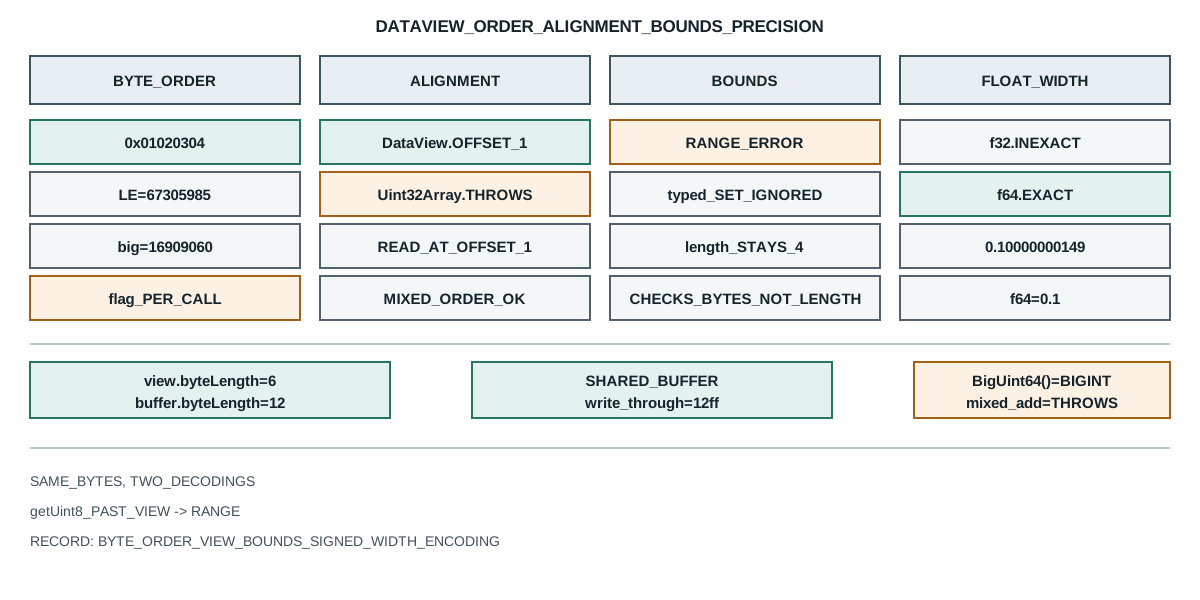
DataView picks the byte order per call, and the default is big-endian. The probe writes one integer and then reads it back both ways:
node=v26.9.0
default-bytes -> 01020304 readLE=67305985 readBE=16909060
unaligned-read -> deadbeef
typed-aligned-required -> RangeError
bounds -> dataview=RangeError typed-set-ignored=true length=4
float-precision -> f32=0.10000000149011612 f64=0.1 f32-exact=false
method-set -> Int8,Uint8,Int16,Uint16,Int32,Uint32,Float32,Float64,BigInt64,BigUint64
shared-buffer -> bytes=12340000 view=1234
write-through -> view-after-byte-write=12ff
offset-view -> byteLength=6 byteOffset=4 bufferByteLength=12
getUint8-at-view-end -> 0 end-throws=RangeError
decode -> utf8=hié latin1=hié bytes=4
bigint -> value=18446744073709551615 mixed-add=TypeError
The four bytes on the wire are 01 02 03 04 in memory order, and the same memory reads as two different numbers depending on the flag. 16909060 is 0x01020304, which is the read that matches the write, and 67305985 is 0x04030201, which is the same bytes read the other way. So the write put the high byte of 0x01020304 at offset zero. A reader that passes true where the writer used the default sees the integer byte-reversed, and the mistake is invisible in a hex dump because the bytes look correct.
That asymmetry is why a network field always has its byte order written down in the specification, while a file format written by a local process usually inherits the host order. The default is big-endian, which happens to match most network headers and is the opposite of the host order on every current mainstream target, so a page that omits the flag reads a locally written binary file byte-reversed. Passing the flag explicitly is the only way a record can state what it read, in either direction.
There is a second-order consequence that catches a reader who does remember the flag. The flag is per call, not per view, so one DataView can read its first field big-endian and its second little-endian, and both are legal. A binary format with a legacy big-endian header followed by a little-endian body is exactly this shape, and a parser that sets the order once, at construction, has no way to express it. The flag has to travel with the field, which means the field table in the parser has to name the order alongside the width and the signedness.
The float methods take the same flag, and the failure there is even quieter. A Float32 written big-endian and read little-endian does not throw and does not produce a recognisable wrong integer; it produces a small denormal or an enormous value, both of which look like plausible measurements until the page compares them to a range. A reader that validates a float against expected bounds catches the collision only when the byte-reversed bits happen to fall outside the range, and a page that trusts the value blindly has no detection at all.
Where a view is more permissive than a typed array
A DataView does not require its offset to be aligned to the width it reads, while a typed array view does. The probe writes and reads an integer at offset one:
unaligned-read -> deadbeef
typed-aligned-required -> RangeError
The DataView read the four bytes starting at offset one and returned the value it wrote. The Uint32Array over the same buffer at the same offset threw a RangeError, because a typed array view requires its byteOffset to be a multiple of its element size. That is the structural difference: a DataView is a cursor over bytes, and a typed array is a window that must line up with its own element grid.
The element semantics of the typed array itself are covered by ArrayBuffer and typed array views. The choice between them follows from that. A parser that walks a header field by field with mixed widths and no padding uses a DataView. A page that reads a large block of one type, such as a pixel buffer or a samples array, uses a typed array and pays the alignment requirement once. A page that needs both can create a DataView and several typed array views over the same buffer, one for each purpose, because they all share the memory.
The alignment rule has a performance consequence that is easy to invert. An aligned typed array read can map to a single machine load, while a DataView read has to assemble the bytes and is allowed to be slower on the same field. That is why a page that parses a hot loop of one element type uses a typed array even when the buffer is not aligned at the start, by advancing to the first aligned offset and skipping the leading bytes, and why a page that parses a cold, mixed-width header uses a DataView and accepts the per-field cost. The two are not interchangeable at the same speed, and choosing one for the other's reason is a common source of a slow parser that is also hard to fix later.
Bounds behave differently in the two, and the difference is the dangerous one. The probe reads one integer past the end and writes one byte past the end:
bounds -> dataview=RangeError typed-set-ignored=true length=4
The DataView read threw a RangeError, which stops a parser at the exact field that could not be read. The typed array write to index ten on a four-byte array did nothing at all, and the length stayed four, so a page that fills a buffer by index and checks only the length afterwards cannot tell a dropped write from a successful one. In a code path that decodes untrusted input, the throwing behaviour is the one that fails loudly and the silent one is the one that produces a plausible but wrong result.
What each width costs in precision
The view exposes ten element types, and the two float widths differ in what they can represent:
method-set -> Int8,Uint8,Int16,Uint16,Int32,Uint32,Float32,Float64,BigInt64,BigUint64
float-precision -> f32=0.10000000149011612 f64=0.1 f32-exact=false
Both widths were given the same literal 0.1, and only the sixty-four-bit read came back as 0.1. The thirty-two-bit read returned 0.10000000149011612, which is the nearest value a thirty-two-bit float can hold. A page that reads a field as Float32, rounds it for display and compares it to a stored 0.1 gets a mismatch that has nothing to do with the data.
The integer widths have the same problem in a different form. Int8 and Uint8 differ only above 127, where the signed form wraps to negative, so a byte the sender wrote as 200 reads as -56 through getInt8. A page that picks the signed getter for a field the specification calls unsigned gets a negative number in a range that is documented as positive, and the error only appears once a value crosses the halfway point.
The Float64 case also shows why a comparison of two floats across two runtimes needs care. The value 0.1 is not exactly representable in binary at any width, and the sixty-four-bit read printed 0.1 only because the display rounded it. A record that stores the displayed value rather than the raw bits has stored a rounded number, and two runtimes that agree on the display can still hold different bits.
The same precision point decides how a checksum is compared. A page that reads a thirty-two-bit digest word as Float32 is not comparing the word at all: a float read reinterprets the bit pattern as a fraction and an exponent, so almost every distinct word maps to a different float and the comparison stops meaning "same bits". Worse, several patterns map to the same value, including the two zeroes, so a difference the digest intended to report can vanish. The fix is to keep a binary digest in its integer width, use getUint32 rather than a float getter, and compare the integers directly. A checksum is never a float, and reading one as a float is the mistake that makes a verification pass when it should fail.
How a view and a typed array share one buffer
A DataView holds a reference to an ArrayBuffer, not a copy, so every other view over that buffer sees the same memory. The probe writes through the DataView and then through the Uint8Array:
shared-buffer -> bytes=12340000 view=1234
write-through -> view-after-byte-write=12ff
The big-endian write of 0x1234 landed as 12 34 00 00, which is what the byte view saw. Writing 0xff to the second byte changed the integer the view reads to 0x12ff without touching the DataView at all. A page that snapshots one view and expects it to stay put across another view's writes has a stale value; a page that relies on the sharing deliberately has a cheap way to reinterpret the same memory.
That sharing is why a DataView is a good fit for a protocol parser that also wants a byte-level checksum. The parser reads fields through the view, and a Uint8Array over the same buffer sums the bytes, and neither copies the buffer. The cost is that any mutation is visible everywhere, so a parser that writes back into the buffer it is reading can corrupt a checksum computed earlier unless the order is fixed.
What an offset view reports and how the buffer is shared
A view can be created over a slice of a buffer, and it reports the slice rather than the allocation:
offset-view -> byteLength=6 byteOffset=4 bufferByteLength=12
getUint8-at-view-end -> 0 end-throws=RangeError
The view covers six bytes starting at offset four, and its buffer.byteLength still reports the whole twelve-byte allocation. A page that computes a field offset from buffer.byteLength instead of from the view's own byteLength reads past the slice, which is why the last line matters: reading index six, one past the view's own six bytes, throws even though the underlying buffer has room. The view's bounds, not the buffer's, decide what a read may touch.
That distinction is the one that trips a sub-parser. A function handed a view over one field slice cannot read the next field of the outer frame, because the view ends where the slice ends, and the throw is the only signal that the caller passed a narrower view than the function assumed. A record that stores the buffer length but not the view's offset and length cannot reconstruct which reads were legal.
How bytes become text and where BigInt enters
The text side of the same buffer has its own boundary, which atob and btoa boundaries covers for the base64 case. Bytes are not text until an encoding is named, and the same four bytes decode two ways:
decode -> utf8=hié latin1=hié bytes=4
The four bytes are 68 69 c3 a9. Read as UTF-8 they are h, i and the two-byte sequence for é, giving hié. Read as latin1 each byte is its own character, giving hié. A page that decodes a field with the wrong label gets a plausible string rather than an error, so a protocol that does not name its encoding leaves the reader to guess between two valid answers.
The largest fields need their own getters, and they change the value type:
bigint -> value=18446744073709551615 mixed-add=TypeError
getBigUint64 returned the full unsigned sixty-four-bit value as a BigInt, which is the only way to represent it, because a Number loses precision above 2^53. The probe then added 1 to it as a Number and got a TypeError, which is the language refusing to mix the two numeric types silently. A page that reads a sixty-four-bit field and wants to compare it with a Number has to convert deliberately, and the conversion is where precision is lost if it happens at all.
The signed form, getBigInt64, matters for the same reason on the other side of zero. A sixty-four-bit counter that wraps, or a signed timestamp from a protocol that allows negative values, needs the signed getter, and reading it unsigned turns a small negative into a huge positive. The two getters read the same eight bytes and differ only in how the top bit is interpreted, so a field table that records "sixty-four-bit integer" without the signedness has not recorded enough to reproduce the value.
There is one more boundary worth naming. A BigInt cannot be passed to the JSON serializer, so a page that reads a sixty-four-bit field and tries to log the parsed object throws on the field that is a BigInt while every other field logs fine. The record path has to convert deliberately, usually to a decimal string, and a page that skips the conversion loses the whole log line rather than the one field. That is the same shape as the offset view: the failure is loud at the exact boundary, and the record has to name the type to explain it.
Record a binary reading
A binary reading supports a narrow claim: this runtime, this buffer, this offset and this byte order, produced this value. Five fields keep it checkable:
- The byte order each field was read with, because the default is big-endian and a field from a little-endian file reads byte-reversed.
- The offset and length of the view, not only the buffer, because a read past the view's end throws even when the buffer has room.
- The signedness and width of each integer field, because a signed read of an unsigned byte turns
200into-56. - The float width, because
Float32andFloat64disagree on the value they return for the same literal. - The text encoding, because the same bytes are
hiéin UTF-8 andhiéin latin1.
Public sources
- MDN: DataView
- MDN: DataView.prototype.getUint32
- MDN: DataView.prototype.getBigUint64
- MDN: ArrayBuffer
- ECMAScript: DataView Objects
- BotBrowser: automation consistency reference
Practical conclusion
Pass the byte-order flag on every read and write, because the default is big-endian and a field from a local little-endian file is not. Use a DataView for a mixed-width header and a typed array for a homogeneous block, and remember that the view's own bounds decide what a read may touch. Name the signedness, the width and the text encoding for each field, and treat a BigInt64 read as a separate type rather than a large Number. For the element view itself, read ArrayBuffer and typed array views; for turning bytes into strings, read atob and btoa boundaries.
This article is part of the guide: What Is a Browser Fingerprint?
Related Articles
ArrayBuffer and TypedArray: One Buffer, Many Views
FingerprintTextDecoder and TextEncoder: Bytes vs Strings
FingerprintICU Timezone Aliases and the TZ You Actually Report
FingerprintCrypto Randomness Observability and Browser Fingerprints
FingerprintArray Sort and Comparators: A Function You Can Get Wrong
Fingerprintbtoa and atob: the Latin-1 boundary
Take BotBrowser from research to production
The guides cover the model first, then move into cross-platform validation, isolated contexts, and scale-ready browser deployment.