ArrayBuffer and TypedArray: One Buffer, Many Views
Read one ArrayBuffer as Uint8Array, Uint32Array and DataView: byte versus element length, why slice copies and subarray aliases, byte order, and how a transfer detaches the source.
BotBrowser Team
Want the structured docs for Fingerprint?
This article lives in the editorial library. For step-by-step setup, reference material, and ongoing updates, jump into the docs section.
BotBrowser supports replaying an authorized same-origin fixture under a declared profile and keeping bounded observations about the bytes a page read through a view and the numbers it produced, but it cannot change the host byte order a DataView reads against, cannot make a copy and an alias behave the same, and cannot turn a view's byte length into an identity signal. This review takes one ArrayBuffer and reads it through Uint8Array, Uint32Array and DataView, then records why the same eight bytes carry three different lengths, why slice copies while subarray aliases, how a big-endian and a little-endian read of the same bytes differ, how out-of-range access and integer wraparound behave, and how a transfer leaves the source detached.
TL;DR
- One 8-byte buffer has
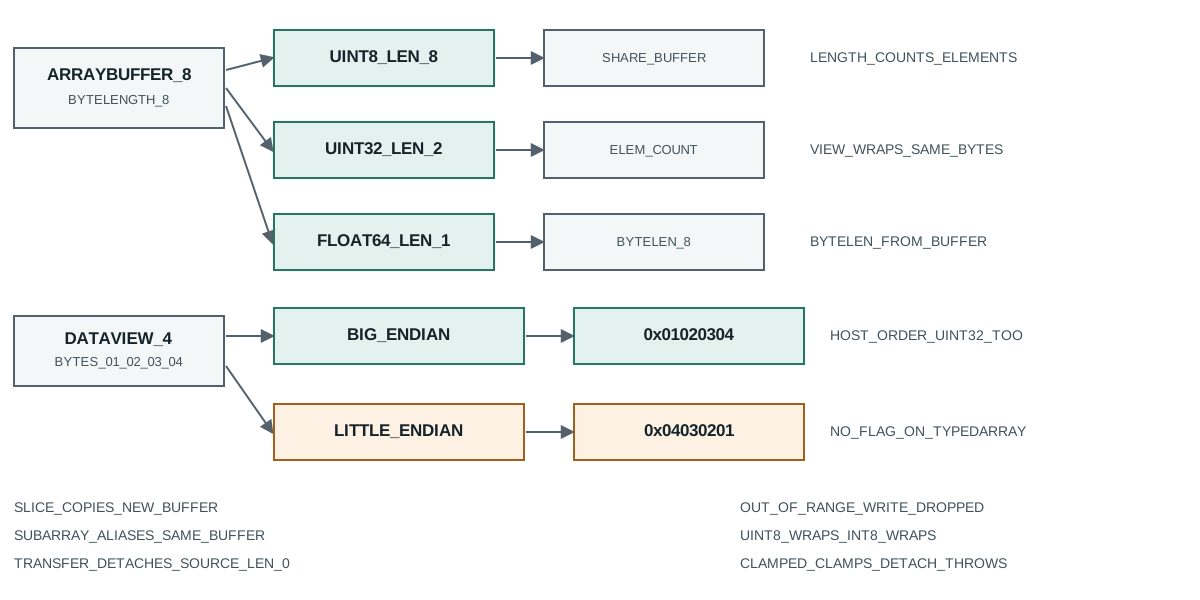
.byteLength8 for every view, butUint8Array.lengthis 8,Uint32Array.lengthis 2 andFloat64Array.lengthis 1; length counts elements, not bytes. - All three views share the same bytes, so a write through one is visible through the others, because they wrap one buffer rather than copying it.
slicereturns a copy on a new buffer, so a write to it leaves the source unchanged;subarrayreturns a view on the same buffer, so a write to it changes the source.DataView.setUint32(0, 0x01020304, false)writes01 02 03 04, and reading the same bytes big-endian gives0x01020304while reading little-endian gives0x04030201.- A
Uint32Arrayreads in host byte order, which on this machine is little-endian, so the same bytes give0x04030201, matching the little-endianDataViewread rather than the big-endian one. - An out-of-range write is dropped and an out-of-range read is
undefined;Uint8Arraywraps 256 to 0,Int8Arraywraps 200 to -56, andUint8ClampedArrayclamps 300 to 255. buffer.transfer(4)detaches the source (byteLengthbecomes 0) and returns a 4-byte copy; using the detached source throwsTypeError.
Contents
- Why one buffer has three different lengths
- Why slice copies and subarray aliases
- How the same bytes read big-endian and little-endian
- Where an out-of-range access and integer wraparound land
- Where a view's window and a transfer change the source
- Record a binary reading
Why one buffer has three different lengths
A buffer is a block of bytes with no notion of what the bytes mean. A view supplies that meaning, and the element size it uses decides how many elements fit in the same block. The probe allocates one 8-byte buffer and builds three views on it:
ArrayBuffer=function DataView=function node=v26.9.0
new ArrayBuffer(8): byteLength=8
same buffer: Uint8Array.length=8 Uint32Array.length=2 Float64Array.length=1
all share bytes: u8.buffer===u32.buffer true
The buffer reports byteLength 8 regardless of which view reads it. The Uint8Array reads one byte per element, so its length is 8. The Uint32Array reads four bytes per element, so its length is 2. The Float64Array reads eight bytes per element, so its length is 1. Three numbers that all describe the same eight bytes, and only one of them is a byte count.
That distinction is the first defect in a binary code path: a caller who reads view.length and multiplies by a byte-per-element assumption gets the wrong byte count for every view except the byte view. The byteLength property is the one that always counts bytes, and it agrees across all three views because it is a property of the buffer window, not of the element type. The .buffer identity check confirms the three views wrap one allocation, so a write through the byte view is visible through the 32-bit view, which is exactly what a decoder relies on when it fills bytes and then reads them as integers.
The practical consequence is that a length written into a record must name which view produced it. A record that says "length 8" is ambiguous: it is a byte length or a Uint8Array length, but a Uint32Array on the same bytes would say two. Both are correct and they answer different questions, so the record needs the element size alongside the number.
The same reasoning decides how a view reports a byte count when the buffer is not a whole multiple of the element size. A Uint32Array on a 10-byte buffer exposes only the two complete four-byte elements that fit, and the trailing two bytes are outside every element it can address. The view's byteLength reflects only the bytes it covers, so the two leftover bytes are neither read nor writable through it, and a parser that assumes every byte of the buffer is reachable through the view silently drops the tail. Choosing the element type for a buffer that is not aligned to it is therefore a decision about which bytes are addressable, not only about how many elements a length reports.
Why slice copies and subarray aliases
Two methods look similar and behave oppositely. slice returns a new view backed by a new buffer, and subarray returns a new view backed by the same buffer. The probe mutates each and checks whether the source changed:
slice then mutate: src[1]=2 sliced[0]=99
subarray then mutate: src[1]=42 sub[0]=42
slice shares buffer: false; subarray shares buffer: true
After slice(1, 4), writing 99 to the slice leaves src[1] at its original 2, and the buffer identity check reports that the slice does not share the source buffer. After subarray(1, 4), writing 42 to the subarray changes src[1] to 42, and the buffer identity check reports that the subarray shares the source buffer. The two methods take the same arguments and produce views of the same three elements, yet one is a copy and the other is an alias.
A decoder that reads a frame, takes a slice for the frame body and stores it is safe to reuse the source buffer for the next frame, because the slice owns its own bytes. A decoder that takes a subarray for the same purpose and then reuses the source buffer for the next frame overwrites the frame body it stored, because the subarray still points into the buffer that just changed. This is a classic aliasing defect: the code looks correct, the element count is right, and the stored bytes are silently the next frame's bytes.
The fix is to decide deliberately which one a record needs. A copy costs an allocation and survives the source being reused; an alias costs nothing and is invalidated the moment the source changes. A record that stores a subarray must either keep the source buffer alive and untouched or copy the bytes out with slice first, and it should say which of the two it did, because a stored alias and a stored copy are indistinguishable by element count alone.
How the same bytes read big-endian and little-endian
Byte order decides which end of a multi-byte number comes first. DataView takes an explicit littleEndian argument, and the probe writes one 32-bit value and reads it both ways:
setUint32 big-endian bytes: 01 02 03 04
DataView read BE -> 0x1020304
DataView read LE -> 0x4030201
Uint32Array (host order) -> 0x4030201
host is little-endian: true
Writing 0x01020304 with littleEndian false (big-endian) lays the bytes down as 01 02 03 04. Reading them back with getUint32(0, false) reconstructs 0x01020304, and reading the same four bytes with getUint32(0, true) reconstructs 0x04030201, the byte-reversed value. The bytes did not change; only the interpretation did, and both interpretations are correct under their own flag.
The Uint32Array line shows the trap. A typed-array view has no byte-order argument; it reads in the host's native order. This machine is little-endian, so the Uint32Array reads 0x04030201, matching the little-endian DataView read. A decoder that parses a network header through a Uint32Array instead of a DataView therefore gets a right answer on a little-endian host and a wrong answer on a big-endian host, with no code change. That is why a binary format spec always names its byte order and why a decoder that must follow the spec uses DataView with an explicit flag rather than a typed-array view.
The host is little-endian line is the cheap way to record which way the machine leans: allocate a Uint16Array holding 1, read its buffer as bytes, and check whether the first byte is 1. A record that stores parsed integers without recording the host order cannot be re-run to the same numbers on a different machine, because the same bytes only reproduce the value under the order that was assumed.
There is a second, quieter consequence for how a view reports a number. Uint32Array yields an unsigned integer, so a value whose top bit is set reads as a large positive number rather than a negative one, and a format that uses a signed 32-bit field needs Int32Array or a DataView.getInt32 call to read it correctly. Two views over identical bytes can disagree on both the magnitude and the sign of the same field, because the element type carries the signedness as well as the width. A record that captures the raw bytes and the element type together can be re-read as either, while a record that captures only the number has already committed to one interpretation.
Where an out-of-range access and integer wraparound land
Typed arrays do not grow and do not throw on an index past their length. The probe writes past the end and reads past the end:
write index 10 on length 3: undefined length=3
Float64Array out-of-range read index 5 -> undefined
Writing 5 to index 10 of a length-3 array does nothing: the length stays 3 and the index reads back undefined, because the write was outside the element window and was dropped. An out-of-range read on a Float64Array also returns undefined rather than NaN, because reading past the length is not a numeric read at all. A parser that trusts user-supplied offsets and writes at a computed index can therefore lose data silently, with every call succeeding, and only a length check before the write catches it.
Writing a value that does not fit has its own behaviour, and three array types show three outcomes:
Uint8Array 256 -> 0; Int8Array 200 -> -56
Uint8ClampedArray 300 -> 255
Uint8Array stores the low 8 bits, so 256 becomes 0; Int8Array stores a signed 8-bit value, so 200 becomes -56. Both wrap modulo the element range without any error. Uint8ClampedArray clamps instead of wrapping, so 300 becomes 255 and a negative value would become 0. A pixel buffer that expects clamping and receives a Uint8Array wraps, so a bright value overflows to a dark one, while the same value on a Uint8ClampedArray saturates at white. The element type is part of the data contract, and a record that says "a byte array" without naming whether it clamps or wraps has not described the arithmetic.
Where a view's window and a transfer change the source
A view can cover a sub-range of a buffer, and a buffer can be transferred. Both change what the source is, and the probe measures each:
view window: byteOffset=4 byteLength=4 buffer.byteLength=16
after transfer(4): source.byteLength=0 moved.byteLength=4
source use after detach -> THREW TypeError
The window line shows a Uint8Array built on a 16-byte buffer with an offset of 4 and a length of 4. The view's byteLength is 4 and its byteOffset is 4, but the underlying buffer.byteLength is still 16. A record that stores only the view's length understates the buffer, and a record that stores only the buffer length overstates the view; the two numbers describe different windows on the same memory, and both are needed to locate the bytes.
The transfer line shows what transfer does. Before the call the source is 8 bytes; after buf.transfer(4) the source byteLength is 0 and the returned buffer holds 4 bytes. The source is detached, and any later use of a view on it throws TypeError, which the probe captures. A transfer moves the bytes to a new buffer and leaves the old one unusable, so code that holds a reference to the old buffer and reads it after a transfer gets an exception rather than stale data. That is a loud failure and therefore easy to catch, but code that transfers a buffer another part of the program still expects to read will crash on that next read, so the ownership of a transferred buffer has to be recorded.
A related boundary is that the encoder output is a Uint8Array view, not a plain array: TextEncoder.encode("café") returns an object whose byteLength is 5 and that passes instanceof Uint8Array. That view is the input the length section above measures, so the byte count a decoder later reads is the same number a record should store.
Record a binary reading
A binary reading supports a narrow claim: this runtime, this byte order, this view and this input produced these numbers. Six fields keep it checkable, and none of them stores a value that a different view would reinterpret:
- The buffer's
byteLengthand, for a view, itsbyteOffsetandbyteLength, because the window and the buffer are different ranges. - The element type of each view used to read the bytes, because one buffer carries 8, 2 or 1 elements depending on the element size.
- The host byte order, because a typed-array view reads native order while a
DataViewtakes an explicit flag. - Whether a derived view is a
slicecopy or asubarrayalias, because only the alias changes when the source buffer is reused. - The clamp or wrap behaviour of the element type, because a value past the element range either wraps modulo the range or saturates to the boundary.
- Whether the buffer was transferred and what happened to its
byteLength, because a detached source throws on the next use rather than reading stale bytes.
What such a record cannot show is anything about where the bytes came from. A buffer is filled by some producer, and a reader that parses it does not know whether the producer wrote UTF-8, a network header in big-endian, or a serialized number in the host order. For the text side of the same bytes, TextDecoder and TextEncoder shows why the same four UTF-8 bytes decode to one string under one label and a mojibake string under another. For the copy side, structuredClone versus JSON shows which container types survive a deep copy and which a JSON round trip collapses, which is the container-level decision that precedes a byte-level reading.
Two habits keep the reading honest over time. First, record the element type and the byte order together with the numbers, because an integer read from the same bytes differs under each. Second, store whether a view is a copy or an alias, and compare the bytes rather than only the element count, because an alias that points into a reused buffer has the same element count as the copy it replaced while holding different bytes.
Public sources
- MDN: ArrayBuffer
- MDN: TypedArray
- MDN: DataView
- MDN: ArrayBuffer.prototype.transfer
- ECMAScript: DataView objects
- BotBrowser: automation consistency reference
Practical conclusion
Treat the view as part of the data contract: byteLength counts bytes, length counts elements, and one 8-byte buffer carries 8, 2 or 1 elements depending on the view. Know that slice copies and subarray aliases, so a stored alias dies when the source buffer is reused. Read binary formats through DataView with an explicit byte order, not through a typed-array view that follows the host order, and record whether the host is little-endian. Expect an out-of-range write to be dropped and an out-of-range read to be undefined, and expect Uint8ClampedArray to clamp where Uint8Array wraps. Record the window, the element type, the byte order, the copy-or-alias choice and the transfer outcome, and compare the bytes rather than the element count so a stale alias cannot pass a green check.
Next reading
For what the same bytes mean as text, read TextDecoder and TextEncoder; for which container types survive a deep copy before any bytes are read, read structuredClone versus JSON.
This article is part of the guide: What Is a Browser Fingerprint?
Related Articles
TextDecoder and TextEncoder: Bytes vs Strings
FingerprintUnicode Normalization: Four Text Identities a Page Reads
FingerprintICU Timezone Aliases and the TZ You Actually Report
Fingerprintbtoa and atob: the Latin-1 boundary
FingerprintstructuredClone vs JSON: What a Deep Copy Actually Keeps
FingerprintCrypto-JS Random Source: Which Branch Your Build Uses
Take BotBrowser from research to production
The guides cover the model first, then move into cross-platform validation, isolated contexts, and scale-ready browser deployment.