btoa and atob: the Latin-1 boundary
Run btoa and atob over accented, CJK and emoji strings to see exactly where each throws, what atob returns, whether padding is optional, and which alphabet is rejected.
BotBrowser Team
Want the structured docs for Fingerprint?
This article lives in the editorial library. For step-by-step setup, reference material, and ongoing updates, jump into the docs section.
BotBrowser supports replaying an authorized, same-origin fixture under a declared profile and keeping bounded observations about which encoding API a page called and what error it raised, but it does not change how a runtime implements btoa or atob, cannot make a Latin-1-only encoder accept astral characters, and does not turn an encoding error into a fingerprint. This article runs both functions over accented, CJK and emoji strings, then records exactly where each one throws, what atob returns, and which inputs decode without padding.
TL;DR
btoaaccepts only code units below 256."café"encodes,"ÿ"encodes, but"Ā"(U+0100) and"😀"throwInvalidCharacterError.- The standard approach is to convert text to bytes first with
unescape(encodeURIComponent(text)), then hand those bytes tobtoa. The result then equals the UTF-8 bytes of the original. atobreturns a binary string, not text. Reading it directly gives mojibake; a second decoding step turns the same bytes back into the original.atobaccepts input without padding and rejects the URL-safe alphabet:"a-b_"throws while"a+b/"decodes.- Base64 output length is
4 * ceil(n / 3), so byte counts 0 through 6 map to lengths 0, 4, 4, 4, 8, 8, 8 with matching padding.
Contents
- Where btoa refuses an input
- The wrapper that converts text to bytes
- What atob returns and why a second step is needed
- Padding, padding omission and the URL-safe alphabet
- Length arithmetic and the all-byte round trip
- Record an encoding reading
Where btoa refuses an input
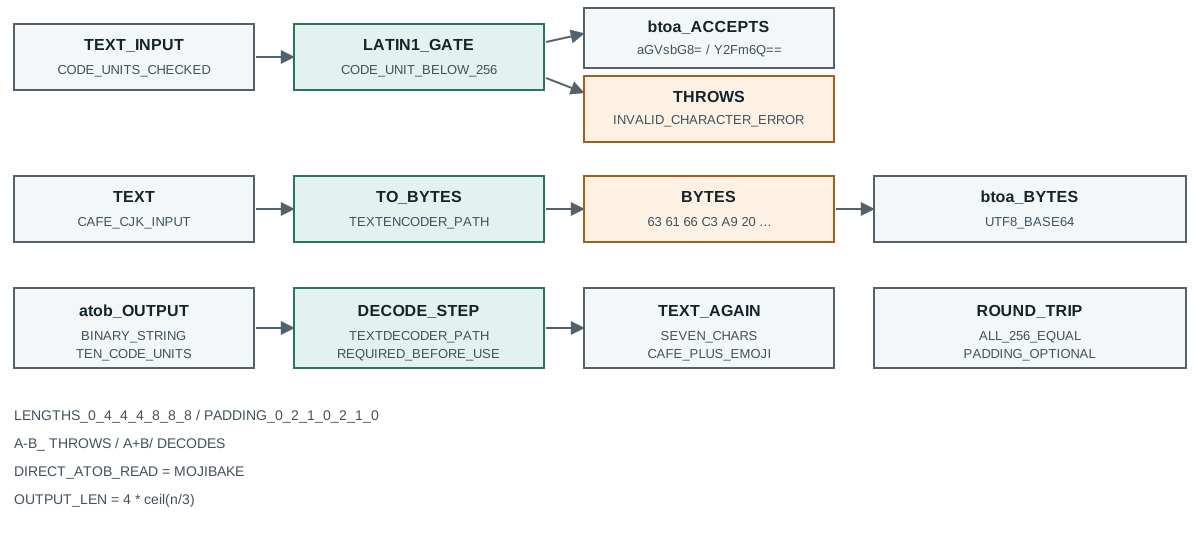
The HTML standard defines btoa over code units, and the constraint is narrower than most callers expect. Every code unit of the input string must be below 256, which means only Latin-1 text passes. The measurement over six strings makes the boundary exact:
btoa("hello") -> ok aGVsbG8=
btoa("café") -> ok Y2Fm6Q==
btoa("ÿ") -> ok /w==
btoa("Ā") -> THREW InvalidCharacterError
btoa("😀") -> THREW InvalidCharacterError
btoa("中文") -> THREW InvalidCharacterError
Two results surprise people. "café" encodes without complaint, because the accented letter in that literal is the single code point U+00E9, which is below 256, so no exception fires. "ÿ" is U+00FF, the last code unit that still fits, and it encodes too. The first refusal is "Ā" at U+0100, one past the boundary, and the exception is InvalidCharacterError.
The emoji row shows why the failure is not about "non-ASCII" as a rough category. An emoji is outside the Basic Multilingual Plane, so it is stored as a surrogate pair, and both halves are code units above 255. btoa sees a code unit of 0xD83D and refuses before it ever looks at the second half. A caller who tests only with Western European text ("café" is a favourite) can ship a path that works in every manual test and breaks the first time an emoji or a CJK name arrives.
The error object is worth recording because it is the only signal a page gets. There is no partial output and no returned status, so a caller that wraps btoa in a try block can distinguish a Latin-1 violation from a missing function only by the name. The message text is short and unspecified, so a fixture should assert on error.name rather than the message.
Nothing in this boundary depends on the runtime version. The numbers above come from node v26.9.0 with its built-in btoa and atob, and the constraint is written into the algorithm, so a browser and Node agree and a test that reproduces the throw in Node will reproduce it in the browser that runs the same page.
There is a second reason the boundary is easy to misread: the accented row and the refusing row look alike on screen. "café" and "Ā" both read as "a letter with a mark", yet one encodes and the other throws, because the deciding property is the numeric code point and not the visual shape. A composed é is one code point below 256; a composed Ā is one code point above it; and a decomposed é written as e plus a combining acute is two code points, the second of which is U+0301 and still below 256, so it also encodes. A reviewer who reasons from appearance rather than from code points will predict the wrong outcome on at least one of these three cases.
That is also why a byte-oriented API pairs badly with text that arrives from a form, a clipboard or a URL. Those sources routinely deliver decomposed forms, zero-width joiners and emoji sequences, and each of them changes which code units reach btoa. Recording the code points of the failing input, not only its rendered text, is what lets a later reader reproduce the exception.
The wrapper that converts text to bytes
The widely copied fix is a two-step idiom. encodeURIComponent turns text into a percent-encoded string of UTF-8 bytes, and unescape turns each %XX back into the byte it represents, leaving a string whose code units are exactly the UTF-8 bytes. Handing that string to btoa produces the Base64 of the UTF-8 bytes.
wrap("café") -> Y2Fmw6k= byteCount=5 btoaMatchesUtf8=true
wrap("😀") -> 8J+YgA== byteCount=4 btoaMatchesUtf8=true
wrap("中文") -> 5Lit5paH byteCount=6 btoaMatchesUtf8=true
Three facts come out of those lines. The byte counts match the UTF-8 length, not the JavaScript string length: "café" is four code units but five bytes, "😀" is two code units but four bytes, and "中文" is two code units but six bytes. The produced Base64 equals the Base64 of the same text encoded by the runtime's own UTF-8 encoder, which the probe checks directly with the btoaMatchesUtf8 flag. And the wrapper never throws for these inputs, because by the time btoa runs, every code unit is already a byte.
The idiom works, and it also carries two liabilities worth naming. unescape is deprecated, and a linter configured for modern JavaScript will flag it, so a codebase that enforces that rule cannot use this exact form. And the round trip through percent encoding allocates three intermediate strings, which matters if the call sits in a hot loop that encodes thousands of small values. The modern replacement builds the byte string with TextEncoder:
function btoaUtf8(text) {
  const bytes = new TextEncoder().encode(text);
  let binary = '';
  for (const byte of bytes) binary += String.fromCharCode(byte);
  return btoa(binary);
}
That version avoids unescape and produces the same Base64, because TextEncoder emits the UTF-8 bytes directly. It is the form to teach, since the deprecated idiom only survives because it predates TextEncoder in older environments.
What atob returns and why a second step is needed
atob is the inverse of btoa, not the inverse of btoaUtf8. It returns a binary string whose code units are the decoded bytes, and it does not know or care that the original was UTF-8 text. Reading that binary string as if it were text is the defect that produces mojibake, and the measurement shows the exact bytes:
atob(b64) is a binary string of 10 code units: 63 61 66 c3 a9 20 f0 9f 98 80
  read as text directly -> "café ð.." equalToOriginal=false
  after escape/decode  -> "café 😀" equalToOriginal=true
Ten bytes, and every one of them matches the UTF-8 encoding of "café 😀": 63 61 66 is caf, c3 a9 is the two-byte sequence for é, 20 is the space, and f0 9f 98 80 is the four-byte sequence for the emoji. The decoded bytes are correct. The failure happens when a caller treats the ten-byte binary string as if it were the ten-character original, which it is not: the original has seven characters and the byte count is ten.
That gap is why a naive implementation appears to work until it does not. For pure ASCII, one byte equals one character, so atob followed by direct use gives the right answer and every test with English text passes. The moment the value contains a multi-byte character, the byte string and the text string diverge, and the caller who skipped the second step stores corrupted data. The probe makes the corruption concrete on a CJK string:
wrong-path round trip of "中文测试" -> "ä¸æ..." equal=false
The correct path mirrors the encoder: take the binary string from atob, reconstruct the bytes, and decode them as UTF-8. The deprecated pairing is decodeURIComponent(escape(binary)); the modern pairing builds a Uint8Array from the binary string and runs TextDecoder:
function atobUtf8(encoded) {
  const binary = atob(encoded);
  const bytes = Uint8Array.from(binary, char => char.charCodeAt(0));
  return new TextDecoder().decode(bytes);
}
Both forms turn the same ten bytes back into seven characters. The lesson a fixture should record is that atob succeeded in both cases, so a check that only asserts "did not throw" cannot detect the mojibake. The record has to compare the decoded text against the original, which is a different assertion from checking the call returned.
A numeric comparison makes the gap impossible to miss. The original string has seven characters; the binary string from atob has ten code units. The extra three come entirely from the two multi-byte characters, é adding one byte and the emoji adding two, which is three in total. A caller who validates a decoded value by comparing lengths against the original text will therefore see a mismatch for every string that contains any character outside ASCII, and a caller who skips the comparison will store the longer byte string and only notice when a downstream parser rejects it.
The same arithmetic explains why the defect survives casual testing. A fixture that encodes and decodes only "hello" sees five bytes in, an eight-character Base64 string, and five characters out, so the original and the decoded text agree and the round trip looks exact. The moment one accented character enters the value the byte count and the character count separate, and the bug appears later rather than in the suite that never fed it a non-ASCII string.
Padding, padding omission and the URL-safe alphabet
Base64 pads its output to a multiple of four with = characters, and callers often assume the decoder requires that padding. The measurement shows atob accepts either form:
atob("aGVsbG8") -> ok "hello"
atob("aGVsbG8=") -> ok "hello"
The first string is missing its final =, and atob still returns "hello". That leniency is useful when a server strips padding for a shorter URL, but it also means a decoder cannot be used to validate that an input was correctly padded. If a fixture must reject unpadded input, that check belongs before atob, not inside it.
The alphabet behaves differently. Standard Base64 uses + and /; the URL-safe variant uses - and _. atob implements only the standard alphabet, so the URL-safe characters raise:
atob("a-b_") -> THREW InvalidCharacterError
atob("a+b/") -> ok "kæÿ"
The second line decodes four characters into three bytes, which happen to form a valid three-character string. The first line throws on the first URL-safe character it meets. A caller who receives a token from a URL, a JWT segment or a filename slug is therefore holding URL-safe Base64, and handing it straight to atob fails on exactly the inputs that use the two substituted characters. The fix is a two-line translation before decoding: replace - with + and _ with /, then restore padding if the length is not a multiple of four. That translation is cheap, and its absence is a common cause of "works for some tokens, fails for others", because a short token may happen to contain neither substituted character.
Length arithmetic and the all-byte round trip
The output length follows a fixed rule that a caller can use to size a buffer or detect a truncated string without decoding it. Each group of three input bytes becomes four output characters, and a final group of one or two bytes is padded to that width:
bytes=0 base64Len=0 padding=0
bytes=1 base64Len=4 padding=2
bytes=2 base64Len=4 padding=1
bytes=3 base64Len=4 padding=0
bytes=4 base64Len=8 padding=2
bytes=5 base64Len=8 padding=1
bytes=6 base64Len=8 padding=0
The pattern repeats every three bytes: a multiple of three has no padding, one leftover byte has two =, and two leftover bytes have one =. So the output length is 4 * ceil(n / 3), and the padding count is (3 - n mod 3) mod 3. A caller can predict the encoded size before encoding, which matters when the value has to fit a column limit or a URL budget: every three bytes cost four characters, so an encoding of a known byte count has a known ceiling.
That predictability has a practical use beyond buffer sizing. Because the encoded length is a pure function of the byte count, a decoder can reject a truncated string without parsing it: if a value claims to encode a certain number of bytes but its length is not 4 * ceil(n / 3), something was cut. Padding alone is not a reliable signal, since atob accepts an unpadded string, but the total length still bounds what the string can represent.
The full byte range closes the loop. Encoding all 256 possible byte values through btoa and decoding them back with atob returns a byte-identical string:
all 256 bytes via btoa/atob: byteIdentical=true length=256
That result is the guarantee a caller actually needs from the pair: whatever bytes go in come back out unchanged, for the whole Latin-1 range, with no loss and no substitution. It also shows the boundary from the earlier section in reverse. btoa handles every byte value from 0 to 255, which is why Latin-1 text encodes, and refuses only code units above 255, which is why any text outside Latin-1 needs the byte conversion first. The two halves of the article describe the same boundary from opposite sides.
Record an encoding reading
An encoding reading that survives a review states the boundary and proves it. Six fields cover the observable part, and none of them stores the secret value:
- The runtime and the function names, so a reader knows the results come from a standard
btoaandatobrather than a polyfill. - The exact strings that encoded and the exact strings that threw, with the error name, so the Latin-1 boundary is reproducible.
- Whether the text-to-bytes wrapper was applied and what byte count it produced, compared against the runtime's own UTF-8 encoder.
- Whether the decode step ran, and whether the result equals the original as text, not merely whether
atobreturned. - The alphabet in use, standard or URL-safe, and whether padding was present.
- The byte count and the resulting output length, so the
4 * ceil(n / 3)rule can be checked.
What such a record cannot show is anything about the data being secret. Base64 is an encoding, not encryption, and a reader can reverse it in one step, so the record should hold round-trip equality and byte counts rather than the decoded content itself. For the wider question of how a page's encoding and text handling interact with the strings it reports, see Unicode normalization and text identity signals, and for a look at how a runtime's byte-level choices surface in a different API, see the crypto-js random source comparison.
Two habits keep the reading honest over time. First, assert on the error name and the byte counts, not the message text, because the boundary is standardized and the message is not. Second, include at least one non-Latin-1 string and one URL-safe token in every fixture that touches these functions, so the two most common silent failures cannot pass a green suite.
Public sources
- MDN: btoa() global function
- MDN: atob() global function
- HTML Standard: forgiving-base64 decode
- RFC 4648: The Base16, Base32, and Base64 Data Encodings
- MDN: TextEncoder
Practical conclusion
Check that every code unit is below 256 before calling btoa, and convert text to bytes with TextEncoder first rather than trusting the input. Treat atob as the inverse of a byte string and always decode the result back to text before using it. Translate URLsafe Base64 to the standard alphabet and restore padding, record the byte counts and the error name, and keep both a non-Latin-1 string and a URL-safe token in the fixture so the silent failures stay visible.
This article is part of the guide: What Is a Browser Fingerprint?
Related Articles
Unicode Normalization: Four Text Identities a Page Reads
FingerprintWhat Is Font Fingerprinting? Cross-Platform Text Consistency
FingerprintCrypto-JS Random Source: Which Branch Your Build Uses
Fingerprintua-parser-js: Client Hints, Bots and a 500-Char Cap
FingerprintCrypto Randomness Observability and Browser Fingerprints
FingerprintText Measurement Fingerprinting: Sub-Pixel Tracking
Take BotBrowser from research to production
The guides cover the model first, then move into cross-platform validation, isolated contexts, and scale-ready browser deployment.