Intl.NumberFormat: Rounding Mode and Sign Display
One probe on number formatting: which rounding mode is the default, what each mode does at a .5 boundary, and how a sign or a trailing zero quietly disappears.
BotBrowser Team
Want the structured docs for Fingerprint?
This article lives in the editorial library. For step-by-step setup, reference material, and ongoing updates, jump into the docs section.
BotBrowser supports replaying an authorized same-origin fixture under a declared profile and keeping a bounded record of the exact string a page rendered for a number, but it cannot make a formatter round the way a reader assumes, cannot restore a minus sign that an option removed, and cannot make two currencies show the same number of decimals. This review runs one probe over eleven fixed cases and records which rounding mode is the default at a .5 boundary, what each explicit mode does to the same four values, how signDisplay and trailingZeroDisplay change the rendered string, how roundingPriority arbitrates between two limits, why a currency's default decimals come from the currency code, and what resolvedOptions() and formatToParts() report about the formatter that actually ran.
TL;DR
- The default rounding is half-expand, away from zero: the probe prints
default -> 3,4,-3,1,1for2.5, 3.5, -2.5, 0.5, 1.45at zero fraction digits, so2.5becomes3, not2. halfEvenis the mode that would give2.5 -> 2, and the probe printshalfEven-vs-expand -> 2,4 vs 3,4, so the two modes differ only where the digit before the boundary is even.trunc,ceilandfloormove a negative number in different directions:-2.5becomes-2undertrunc,-2underceil, and-3underfloor.signDisplay: 'never'removes the minus from a negative number, so the probe printssign:never -> 5,0,5, and a consumer reading that string cannot tell it came from-5.signDisplay: 'always'puts a+on zero as well, so the probe printssign:always -> +5,+0,-5.trailingZeroDisplay: 'stripIfInteger'keeps the two decimals of3.10but drops the two that only existed because of the minimum, so3.00renders as3.roundingPriority: 'morePrecision'widens the output to satisfy both limits, so12.345prints12.35undermorePrecisionwhileautoandlessPrecisionprint12.3.- A currency's default fraction digits come from its code, so the same options print
$5.00and¥5. - Setting
maximumFractionDigits: 0on a currency formatter also setsminimumFractionDigitsto0, andresolvedOptions()reportsmin=0 max=0 mode=halfExpand.
Contents
- Which rounding mode is the default
- What each rounding mode does at a boundary
- How sign and trailing zero change the string
- Where two limits collide
- Record a number-format reading
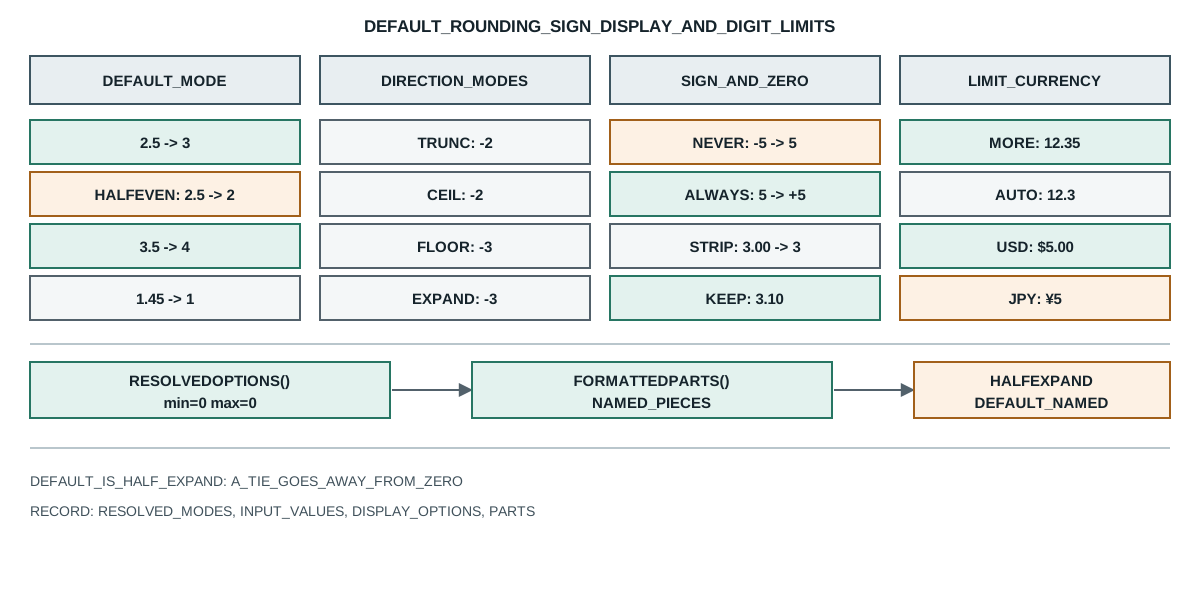
Which rounding mode is the default
A number formatter rounds whether or not the caller names a mode, and the default is a specific choice that a reader rarely checks. The probe formats five values at zero fraction digits with no rounding mode set:
node=v26.9.0
default -> 3,4,-3,1,1
mode:halfExpand -> 3,4,-3,2
mode:halfEven -> 2,4,-2,2
mode:trunc -> 2,3,-2,1
mode:ceil -> 3,4,-2,2
mode:floor -> 2,3,-3,1
mode:expand -> 3,4,-3,2
mode:halfTrunc -> 2,3,-2,2
halfEven-vs-expand -> 2,4 vs 3,4
sign:auto -> 5,0,-5
sign:never -> 5,0,5
sign:always -> +5,+0,-5
sign:exceptZero -> +5,0,-5
sign:negative -> 5,0,-5
trailing:default -> 3.00 3.10
trailing:strip -> 3 3.10
priority -> 12.345:auto=12.3 more=12.35 less=12.3 | 1234.5:auto=1230 more=1234.5 less=1230 | 456.78:auto=457 more=456.78 less=457
currency -> $5.00 ¥5
currency:min0 -> $5
percent -> 13% 13%
compact -> 1.2M 1.2M
digits -> ar-EG=١٢٣٤ ar-EG-latn=1234
grouping -> de-DE=1.234.567,89 en-US=1,234,567.89
resolved -> min=0 max=0 mode=halfExpand
parts -> minusSign:-|currency:USD|literal: |integer:5|decimal:.|fraction:00
The first line is the answer to the question most people get wrong. default -> 3,4,-3,1,1 means 2.5 rounds to 3 and -2.5 rounds to -3, so the default is half-expand, which rounds a tie away from zero. That is not the "round half to even" rule many developers assume from other languages or from a finance course, and the difference appears on every .5 value, which is exactly the kind of number a test fixture is likely to contain.
The second value in that line shows the second half of the same rule. 1.45 at zero fraction digits prints 1, not 2, because 1.45 is not exactly 1.45 in binary floating point; it is a value just below the halfway point, so there is no tie to break and the result is the nearest integer below. A page that assumes a decimal literal is exact will therefore see a .45 round down while a .5 rounds up, and the two behaviours come from the same rule applied to different inputs.
The last value in that line is the one that surprises a report. 0.5 becomes 1, so a small positive value rounds up to a whole unit even though it is the smallest possible number with a single nonzero digit. A page that uses zero fraction digits to print a count of something will therefore show 1 for any value in [0.5, 1.5), and a page that uses it to print a small rate will show 1 for anything from a half upward, which can read as a 100% error on the smallest values.
The locale data that drives the separators and the digit shapes a formatter emits is its own subject, and Intl API locale data records which parts of a locale tag a formatter reads. There is no locale dependence in this result. The probe passes en-US and the mode is a property of the formatter, not of the locale; de-DE or ja-JP round the same way and differ only in the separator and the digit shapes that later lines show. A page that tests rounding only in one locale therefore has seen the whole rule, and a page that assumes another locale rounds differently is reading a difference in grouping as a difference in arithmetic.
The default is also visible in resolvedOptions(), and that is the check worth writing into a record. The probe prints resolved -> min=0 max=0 mode=halfExpand for a formatter that set only maximumFractionDigits: 0, so the resolved mode names the default the caller never wrote. A record that stores the input options but not the resolved ones cannot later explain why 2.5 printed as 3, because the reason lives in a field the caller did not set.
What each rounding mode does at a boundary
The probe then sets every mode the specification offers and formats the same four values, which turns the question into a table. Each line is a mode and its four results for 2.5, 3.5, -2.5, 1.6.
mode:halfExpand -> 3,4,-3,2 is the default made explicit. mode:halfEven -> 2,4,-2,2 sends 2.5 to the even neighbour 2 and keeps 3.5 at the even neighbour 4, so the tie always lands on a value whose last digit is even. The probe's dedicated line makes the difference concrete: halfEven-vs-expand -> 2,4 vs 3,4, so the two modes agree on 3.5 and disagree on 2.5, which is the definition of a tie broken by parity rather than by direction.
mode:trunc -> 2,3,-2,1 drops every digit past the boundary regardless of how close it is, so 1.6 becomes 1 and -2.5 becomes -2. mode:ceil -> 3,4,-2,2 rounds toward positive infinity, so 1.6 becomes 2 and -2.5 becomes -2 because -2 is greater than -2.5. mode:floor -> 2,3,-3,1 rounds toward negative infinity, so 1.6 becomes 1 and -2.5 becomes -3. mode:expand -> 3,4,-3,2 rounds away from zero on every value, so it agrees with ceil on positives and with floor on negatives.
The three directional modes are where a sign-handling bug is easiest to introduce. A page that wants "round up" and reaches for ceil gets -2 for -2.5, which is larger but closer to zero, so a "round up" that means "away from zero" needs expand rather than ceil. A page that wants the conservative choice for a quantity it must not overstate needs floor on a positive value and ceil on a negative one, which is two rules rather than one, and the mode names do not combine them.
mode:halfTrunc -> 2,3,-2,2 rounds a tie toward zero and everything else to the nearest, so 2.5 becomes 2, 3.5 becomes 4, and -2.5 becomes -2. That is the opposite tie direction from halfExpand, and it is the mode to reach for when a page reports a total it must not round up on a tie, such as a count that a downstream system will compare against a limit.
The value 1.6 is the control in every line. It is not a tie, so every mode that rounds to the nearest gives 2 and only the truncating modes give 1. A test that formats one non-tie value and one tie value therefore separates a mode that only changes ties from a mode that changes every value, and a page that tests only 1.6 cannot tell halfExpand from halfEven at all.
The consequence for a record is that the mode belongs in it. Two runs of the same app can print 2 and 3 for the same 2.5 if a formatter was constructed once with halfEven and once with the default, and the stored string cannot say which mode produced it. A record that keeps the resolved roundingMode alongside each formatted value makes the difference reproducible instead of a mystery that appears only on the values that happen to be ties.
How sign and trailing zero change the string
Two display options change the width and the sign of the output without changing the value, and the probe's sign lines show a case where the sign is lost.
sign:auto -> 5,0,-5 is the default: no sign on a positive or a zero, a minus on a negative. sign:always -> +5,+0,-5 puts a plus on the positive and on the zero, so a reader can see that a number was formatted with a sign, and a diff of two reports can distinguish an unchanged positive from an unchanged negative. sign:exceptZero -> +5,0,-5 puts the plus on a positive but leaves the zero bare, which is the option to pick when a zero is a real value that should not look signed.
sign:never -> 5,0,5 is the dangerous one. It removes the minus from -5 and prints 5, so a consumer that parses the string back to a number gets a positive value from a negative input. A page that renders a delta with sign:never on the assumption that "the sign is shown elsewhere" produces two identical strings for +5 and -5, and a downstream parse cannot recover which one it was. sign:negative -> 5,0,-5 is the option that shows a minus only when the value is negative, which is the usual intent behind reaching for never, and it keeps the sign on the negative.
The trailing-zero option changes the decimals that exist only because of a minimum. The probe prints trailing:default -> 3.00 3.10 for a formatter with a two-digit minimum and maximum, and trailing:strip -> 3 3.10 after setting stripIfInteger. So an integer-valued number loses its zero fraction while 3.10 keeps its trailing zero, because 3.10 is not an integer and only the integer case is stripped. A column of prices that uses the default shows 3.00 and 4.00, and the same column with the strip option shows 3 beside a neighbouring 3.10, which is a mixed-width column that a table can align badly.
Both options interact with the value's sign and fractional part in ways the options list does not state. stripIfInteger on -3.00 gives -3, so the minus is preserved; sign:always on -3.00 gives -3.00, so the sign and the fraction are independent. A page that composes both must decide what it wants for -0, and the probe's +0 under sign:always shows the formatter will print a sign on a zero, which is the value a subtraction of equal numbers often produces.
The width of the output is therefore not a property of the number alone. The same 5 renders as 5, +5, 5.00 or +5.00 depending on three options, and a layout that reserves a column width by measuring one variant will clip or shift the others. A page that formats a table should fix the options once and use them for every cell, rather than letting a default and an explicit option meet inside the same column.
Where two limits collide
Two options can both limit the digits, and which one wins depends on a third option that most code never sets. The probe combines maximumSignificantDigits: 3 with maximumFractionDigits: 2 and formats three values under each roundingPriority; the transcript records those results on the priority -> line.
auto and lessPrecision agree on every value: 12.345 becomes 12.3, 1234.5 becomes 1230, and 456.78 becomes 457. Both honour the significant-digit limit and treat the fraction limit as satisfied by the result, so the three-digit rule wins and the two-digit fraction rule never binds. morePrecision is the odd one: it prints 12.35, 1234.5 and 456.78, which keeps more digits than either limit alone would allow, because it rounds so that both limits are satisfied rather than letting one dominate.
The 1234.5 case makes the surprise visible. Under auto the number becomes 1230, three significant digits and no fraction, while under morePrecision it stays 1234.5, four significant digits and one fraction. A page that sets both limits expecting "at most 3 significant digits and at most 2 decimals" gets 1230 under the default, and a page that sets morePrecision expecting "the stricter of the two" gets the looser result. Neither reading of the options matches the behaviour, which is why the resolved output belongs in the record rather than the intent behind it.
A formatter that means one limit should set one limit. Setting both and relying on the default priority produces the significant-digit behaviour, so a page that only wanted "two decimals" should set maximumFractionDigits alone, and a page that only wanted "three significant digits" should set maximumSignificantDigits alone. The combination is for the case where both must be respected, and that is what morePrecision states explicitly rather than leaving to the default.
The currency lines show a second limit the caller never sets. currency -> $5.00 ¥5 prints two fractions for a US dollar and none for a Japanese yen, because the default fraction digits come from the currency code, not from the locale or the options. currency:min0 -> $5 shows that setting minimumFractionDigits: 0 overrides the code's default, so the symbol and the decimals are two separate decisions. A page that prints a price table across currencies therefore gets a different width per currency, and the only way to know which is to read resolvedOptions() for each code.
percent -> 13% 13% and compact -> 1.2M 1.2M show the same shape of surprise from a different option. 0.125 as a percentage is 12.5%, and the default rounds it to 13%, so a rate that a reader expected as a half-percent becomes a whole percent. The compact notation rounds to significant digits rather than fractions, so 1234567 becomes 1.2M under both the default and an explicit maximumFractionDigits: 1, because the notation already limits the digits before the suffix.
The digits and grouping lines are the reminder that the value and the string are separate objects, and the same locale data also decides how a time zone is rendered beside a formatted number. digits -> ar-EG=١٢٣٤ ar-EG-latn=1234 renders the same 1234 with Arabic-Indic digits in one locale and Latin digits with a Unicode extension in the other, and grouping -> de-DE=1.234.567,89 en-US=1,234,567.89 shows the separator swap that comes from the locale alone. A page that parses a formatted string back to a number has to know both, and a page that stores only the string has already lost the number.
resolvedOptions() is the field that closes the loop. The probe prints resolved -> min=0 max=0 mode=halfExpand after setting only a maximum, so the minimum followed the maximum down to zero even though the caller never asked. That is the rule a page most often misses when it sets a maximum on a currency formatter: the currency's default minimum of two is replaced, not kept, and the difference between $5.00 and $5 is a single option that the caller did not write.
formatToParts() is the other half of the record. The probe prints parts -> minusSign:-|currency:USD|literal: |integer:5|decimal:.|fraction:00, so each piece of the output is named and a consumer can rebuild the string or reorder the pieces from the named types. A page that renders a price with the currency after the number in one locale and before it in another can do that from the parts rather than from the whole string, which is the reliable way to handle a locale whose order differs.
Record a number-format reading
A number-format reading supports a narrow claim: this runtime, this locale, these options, produced this string. Four fields keep it checkable:
- The resolved options, because
resolvedOptions()names the rounding mode, the minimum and the maximum that actually ran, and the caller's intent is not in the string. - The rounding mode and the input values, because a tie and a non-tie value can differ by a full unit and a record without the input cannot tell which happened.
- The sign and fraction display options, because
sign:nevererases a minus andstripIfIntegererases a zero fraction, and neither is recoverable from the output. - The parts, because the order and the pieces of a locale's output differ, and a stored string cannot be re-parsed without the locale that produced it.
Public sources
- MDN: Intl.NumberFormat
- MDN: Intl.NumberFormat() constructor
- MDN: formatToParts()
- MDN: Math.round()
- ECMAScript: NumberFormat and rounding
- Unicode: rounding modes in UTS #35
- BotBrowser: automation consistency reference
Practical conclusion
Set the rounding mode instead of trusting the default, because the default is half-expand and a .5 value will not round the way a "round half to even" reader expects. Keep the minus sign with sign:negative rather than sign:never, since never turns a negative into a positive string that a parser cannot recover. Choose one digit limit rather than two unless both must bind, and read resolvedOptions() after building a currency formatter because a maximum also lowers the minimum. For the locale data that drives the separators and the digit shapes, read Intl API locale data; for the time-zone half of the same formatter family, read time zones and locale language.
This article is part of the guide: What Is a Browser Fingerprint?
Related Articles
Intl.Collator: Locale Order Is Not Code-Unit Order
FingerprintUnicode Normalization: Four Text Identities a Page Reads
PlatformIntl API Locale Data and Portable Browser Formatting
FingerprintIterator Helpers: Laziness, Single Use and Early Stop
FingerprintMicrotasks and Timers: The Order Your Code Actually Runs
FingerprintICU Timezone Aliases and the TZ You Actually Report
Take BotBrowser from research to production
The guides cover the model first, then move into cross-platform validation, isolated contexts, and scale-ready browser deployment.