浏览器自动化无障碍测试:实用指南
构建检查键盘访问、语义名称、焦点、播报和包容性错误状态的自动化测试。
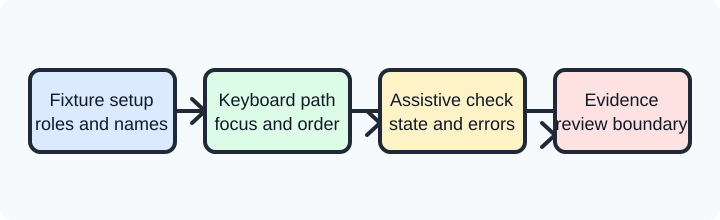
Browser automation accessibility testing is most useful when it checks the same journey a person must complete: finding a control, reaching it without a pointer, understanding its name and state, completing a task, and recovering from an error. An automated run cannot certify every aspect of accessibility, but it can protect repeatable contracts that are otherwise easy to regress. The practical goal is a small, observable test that explains what was checked and what still needs human review.
Start with an authorized synthetic page or test account. The browser can observe rendered semantics, focus movement, keyboard behavior, and visible status. It cannot establish that a real person with a particular assistive technology will experience every interaction correctly, nor can it prove that a service processed a remote mutation. Keep those boundaries in the result so a green browser assertion is not presented as a complete conformance claim. The Web Content Accessibility Guidelines provide success criteria; the ARIA specification explains roles, states, and properties.
Accessibility testing should also include the states that customers meet most often: a returning user, a narrow viewport, a changed language, a blocked permission, and a network response that arrives late. For each state, define the expected focus, name, status, and recovery action. This keeps the test close to the product promise while leaving room for manual review of speech, magnification, and cognitive load.
An accessibility run is strongest when its scope is visible before it starts. Name the route, synthetic data, viewport, input mode, expected landmark, and cleanup owner. Decide whether the run is a component check, a complete task, or a compatibility sample. This prevents a narrow keyboard assertion from being reported as an audit of the whole product and gives reviewers a clear reason to add manual checks.
Turn an accessibility requirement into an observable contract
Write the user outcome before choosing a locator. “A keyboard user can open the filters, choose a value, and understand that the list changed” is a contract. “Click the filter button and wait two seconds” is an implementation detail. A useful test names the starting state, the action sequence, the expected focus owner, the visible or announced result, and the bounded evidence retained when a step fails.
Separate browser observations from application meaning. A button can expose an accessible name while its server request is rejected. A status region can receive text while a screen reader queue presents it later or not at all. Assert the browser facts you own, then make a separate application assertion for the user-visible outcome. This separation lets a page owner fix semantics without implying that the test inspected private service data.
Prefer one journey per test. A sign-in test should not also verify a settings dialog and a file export because a focus failure in the first step would obscure the later contracts. Give each journey a synthetic input, an owner, and a cleanup path. Keep the result short: scenario label, browser and framework versions, failed contract name, and a permitted screenshot or trace reference. Never serialize tokens, full page text, or a private session merely because the driver can.
Check names, roles, and states without overfitting
Accessible locators describe what a person can identify. A role with an accessible name, a label associated with a form control, or a stable test identifier can make the test readable. A generated class or a deep CSS path says little about the interaction and tends to break during harmless layout work. When a control intentionally has no visible text, document its accessible name and test the name as part of the component contract.
Names and descriptions are not interchangeable. A dialog needs a name that identifies its purpose; a description can add context. A required field should expose its required state, and an invalid field should expose an error relationship that points to useful text. Test the state transition, not only the initial markup. A form can render aria-invalid="true" while leaving the old error message in the DOM, which is a confusing result for both automation and assistive technology.
Avoid asserting incidental ARIA attributes when native HTML already supplies the behavior. A native button, label, heading, list, and link carry well-defined semantics and keyboard behavior. ARIA can describe a custom widget, but the widget owner must implement its interaction model. An automated check that only sees a role="button" cannot confirm that Space and Enter both activate it, that focus remains visible, or that a disabled state prevents accidental activation.
Exercise keyboard focus as a first-class path
Keyboard coverage should follow the task, not a random sequence of Tab presses. Begin at a known focus point, move through the meaningful controls, activate one action, and record where focus goes next. A modal should move focus into its content, keep focus from escaping while open, and return focus to a sensible trigger when closed. A skip link should become visible when focused and move to the intended landmark.
Check for a visible focus indicator without requiring one exact color or pixel value. The contract is that a user can identify the focused control against the approved theme. A screenshot can support a review, but it is not a universal contrast proof across displays. Use CSS and computed-style assertions only for properties the component owns, and leave nuanced visual judgment to a human review that includes high contrast and zoom.
Test keyboard alternatives for custom widgets. A menu, combobox, tablist, tree, or dialog has a documented set of keys and state changes. Test the supported keys, the selected or expanded state, and the next focus target. Include Escape or the documented cancellation path. Do not press arbitrary keys until something changes; that turns a deterministic contract into a probe and can make a failure hard to classify.
A keyboard test should also cover the blocked path. If a required field is empty, submit with the keyboard and verify that the error is visible, associated with the field, and reachable in a logical order. If a permission dialog is denied, verify that the page provides a usable alternative. A test that only covers the happy path can leave keyboard users stranded exactly where the application needs to explain a problem.
Verify announcements and dynamic content
Dynamic interfaces need an announcement strategy. A polite status message may use a live region; an urgent interruption may require a different policy. The test can assert that the region exists, has the intended role or politeness, and receives the expected short text after the action. It should not claim that every screen reader, speech setting, or operating-system queue will present the message identically.
Keep live-region assertions stable. Wait for the named state change, then read the region's accessible text once. Do not poll by repeatedly triggering the action, and do not accept any non-empty string as success. If the application intentionally updates the same region several times, assert the final user-relevant message and record the transition that led there. A timeout should identify the missing announcement, not merely say that the page was slow.
Loading and error states deserve equal treatment. A spinner alone may not explain progress to a non-visual user, while a disabled button without a reason can look like a broken control. Test the relationship between busy state, status text, and eventual content. When a request fails, verify that the error is announced or placed where the user will encounter it, and that retry or alternative actions are keyboard reachable.
Do not use automation to harvest accessibility trees from unrelated sites or real-user sessions. In a controlled fixture, an accessibility snapshot can help compare a component before and after a change. Keep only the nodes needed to explain the assertion, redact user content, and apply the same retention policy as screenshots and traces. The snapshot is evidence of one browser observation, not a record of a person or a universal accessibility score.
Make fixtures and parallel runs inclusive
An accessibility fixture owns more than a browser context. It owns the initial viewport, zoom or text-size setting, reduced-motion preference when relevant, locale, synthetic account, and artifact directory. Declare which values are fixed for the scenario and which are varied in a separate matrix. A worker must never inherit another worker's focus state, storage, download path, or screenshot filename.
Use a clean context for each independent journey when cookies, permissions, or stored preferences affect the result. A context isolates browser-managed state, but it is not an operating-system sandbox and it does not delete a server record. If an application stores a preference remotely, ask the application owner for the supported reset operation. The fixture can report what the browser observed before and after that operation.
Parallel workers should use synthetic records and private output paths. If two workers mutate one record, a clean context cannot prevent a service race. Prefer independent records or serialize the specific mutation. A retry is a new attempt: close the old context when its state is uncertain, create a fresh owned context, and report that the first action may have reached the application. Never hide a possible duplicate submission behind a longer wait.
Include an intentional failure case in the fixture suite. Withhold a landmark, delay a status update, or return a documented validation error from the synthetic page. The expected result is a bounded failure naming the missing contract followed by deterministic cleanup. This verifies the test harness, not a production service, and keeps accessibility evidence proportional to the question being asked.
Separate tool support from conformance claims
Playwright and Selenium can drive keyboard input, inspect accessible names, and wait for visible or semantic state. Their APIs differ, and browser support for accessibility-related features can vary by release. Record the framework, driver, browser, operating system, and relevant preferences with the result. A passing run on one tuple is evidence for that tuple; it is not a promise that every browser and assistive technology behaves identically.
Automated rules engines can catch missing names, duplicate IDs, contrast risks, and some structural problems. Use them as a review aid, not as a substitute for keyboard exploration, zoom, reflow, screen-reader checks, or domain-specific user research. A rule report should identify the node and rule, while the journey test should explain whether the user can complete the task. Keep failures from both tools separate so a rule warning does not get misread as a failed business outcome.
When a browser exposes an accessibility snapshot or computed role, compare only stable, user-relevant fields. Snapshot formats can change between framework versions. Prefer an assertion such as “the Save button is named Save profile and is enabled after valid input” over a byte-for-byte tree comparison. Store a small diff or an element reference, and review larger changes intentionally when a component's semantics are redesigned.
The W3C WebDriver specification defines the automation boundary, while WCAG defines outcomes that involve people and content. Neither source says that a particular product, profile, or automation driver can certify conformance. Phrase your report accordingly: list the tested journeys, environments, observed failures, and manual checks still required.
BotBrowser capability and limitation
BotBrowser provides isolated BrowserContexts with separate cookies, storage, and session state, which helps teams repeat authorized accessibility journeys from known browser-side starting points. BotBrowser does not replace Playwright or Selenium accessibility assertions, screen-reader or keyboard policy, application semantics, WCAG review, or server-side cleanup. It cannot guarantee that a target application exposes a correct accessible name, that an assistive technology speaks a live-region update, or that a remote session and record are invalidated. The fixture owner still chooses the framework, creates and closes contexts, controls synthetic data, and obtains evidence outside the browser boundary from the application owner.
Keep the capability and limitation together in reports. Record the context purpose, browser release, preference inputs, journey contract, observed outcome, and manual checks that remain. Do not describe an isolated profile as proof of accessibility or as a way to work around an application's controls. A clean local state makes a test repeatable; it does not change the responsibilities of the page, service, or assistive technology.
Review failures and maintain the test suite
Classify a failure before changing a locator or timeout. A missing accessible name is a component defect. A focus trap that never releases may be a widget lifecycle defect. A missing announcement can be a page state or assistive-technology integration issue. A driver disconnect is infrastructure evidence. A server rejection is an application result. The browser test should preserve the first missing contract and route the next action to the owner who can change it.
Review the negative paths after each component change. Test an empty form, a rejected value, a denied permission, a slow response, a closed dialog, and an interrupted navigation where those states are part of the journey. Verify that every error has a readable explanation and a reachable next action. Keep the same evidence boundary for pass and fail so a failure does not suddenly collect more private page content.
Before merging, run a clean-context keyboard journey, a preference-sensitive journey when applicable, and one forced teardown failure. Confirm that focus returns to an intentional owner, that artifacts are worker-specific, and that cleanup runs after assertion and setup errors. Recheck the browser and framework tuple when versions change. A stable test is not one that never fails; it is one whose failure identifies a user-facing contract and leaves no state that can distort the next run.
Accessibility automation works best as a layered practice: semantic locators protect component meaning, keyboard journeys protect task completion, announcements and error states protect communication, and human review protects experiences that code cannot model. Keep each layer explicit, bounded, and honest about what it observes. That discipline gives product teams useful regression evidence without turning a browser capability into an unsupported conformance guarantee.
Accessibility checks become easier to maintain when every result names the journey, the environment, the owner, and the remaining uncertainty. Keep a short history of tested browser and framework versions, note whether a human review covered zoom or a screen reader, and revisit the contract when a component changes. This record helps customers compare releases, prioritize fixes, and avoid treating a single automated pass as a universal promise.
Sources
另请参阅 BrowserContext 生命周期 和 浏览器交互验证。
BotBrowser 提供隔离的 BrowserContext,可在 cookies 和存储分离的前提下重复授权流程。它不能替代 Playwright 或 Selenium 断言、WCAG 审查、屏幕阅读器测试或服务器端清理。